OPEN WORLD
CONTROLLER
A third-person character with everything an open-world game hangs on it: movement, combat, vehicles on land, water and air, a living town, and the tools that build them.
1What is in the package#
Open World Controller is one package that gives a project a complete third-person player and the world around it. Every part is data-driven and set up by an editor window, so most games are built without writing code; when code is needed, Part 2 shows the calls.
| Area | What you get |
|---|---|
| Character | Walk, run, sprint, jump, crouch, vault and climb, swim on and under water, superhero flight with laser eyes, free fall and a steerable parachute, fall damage, breath, rag doll on death, respawn. |
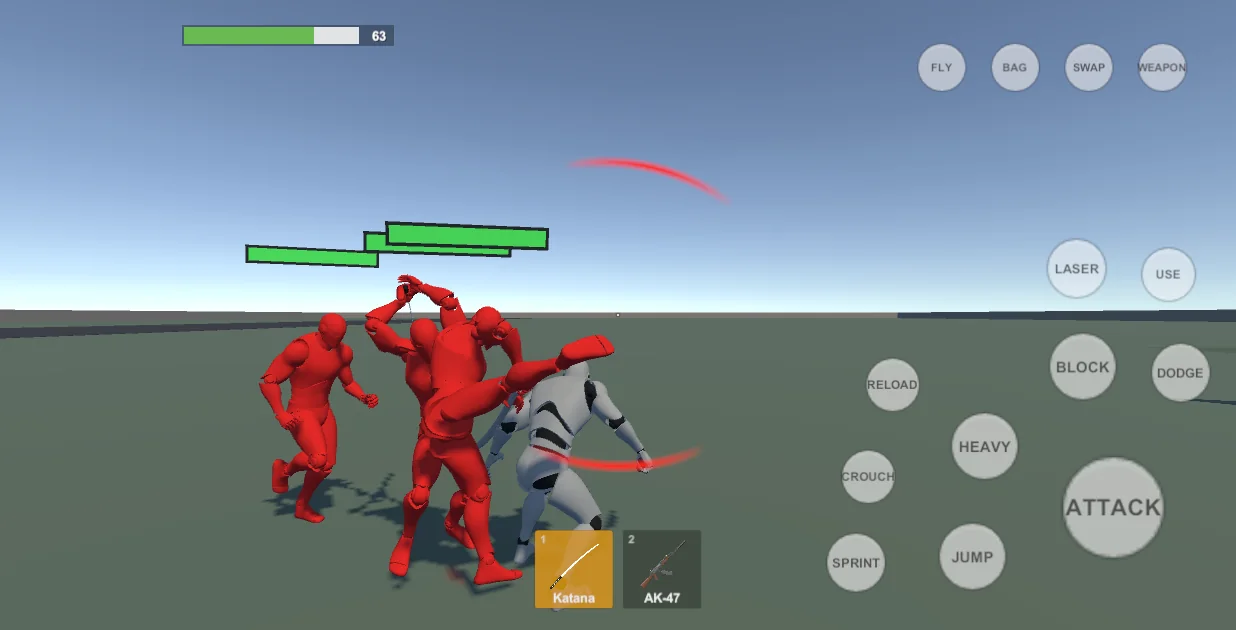
| Combat | Fists and kicks, blades with combos, blocking and dodging, a bow, and guns of every class (pistols, SMGs, rifles, shotguns, snipers, machine gun, launchers, grenades) with recoil, sights and reloads. A two-slot weapon bag with drag and drop. |
| Vehicles | Cars with doors and a steering wheel, motorbikes, scooters, bicycles, boats, helicopters, propeller aircraft and jets. Getting in and out, bailing out, pulling a driver out, damage, fire and explosion, engine sound by speed. |
| World | A City Builder (roads, houses, plaza, park, optional sea with harbour and airfield), water volumes, pedestrians and traffic on paths, a wanted level with police on foot and in patrol cars, pick-ups, people to talk to, a baked minimap, saving. |
| Enemies | Melee and gun enemies with teams, cover, health bars and rag dolls, built from any humanoid model. |
| Platforms | Mobile first: one touch HUD that rearranges itself for walking, driving and flying. Keyboard and mouse and gamepad drive the same player with no extra work. |
Requirements
- Unity 2022.3 LTS or newer, Built-in Render Pipeline.
- The Input System package (Active Input Handling: Both or Input System).
- Nothing else to start: the package includes a demo character, animation clips, weapons and vehicles, and two demo scenes. To use your own character you need a humanoid model and animation clips for it (the package generates the poses it needs for sitting in vehicles, the parachute and free fall).
2Quick start#
- Import the package. Everything is under
Assets/OpenWorldController. - Open Tools > OWC > Open World Controller Hub. It is the front door to every tool.
- Make somewhere to stand. Press City Builder and then Build, or use your own scene: any ground with a collider will do.
- Make the player. Press Character Builder, drop your humanoid model and a Locomotion Animation Set in, and press Build. The builder adds the motor, the camera rig, both input providers, the HUD and saves a prefab.
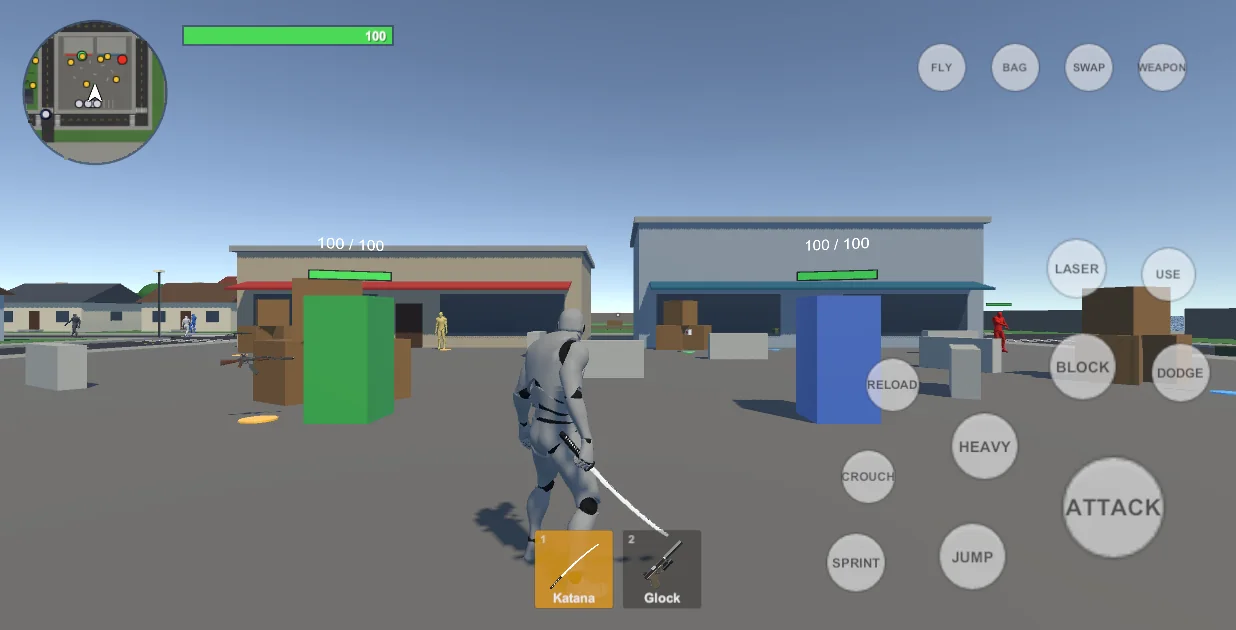
- Press Play. Move with WASD and the mouse, or switch Tools > OWC > Input Mode > Mobile to try the touch HUD in the Editor.
- Add what the game needs: weapons, enemies, vehicles, traffic, police. Each has a section in the Hub and a chapter here.
3The Hub window#
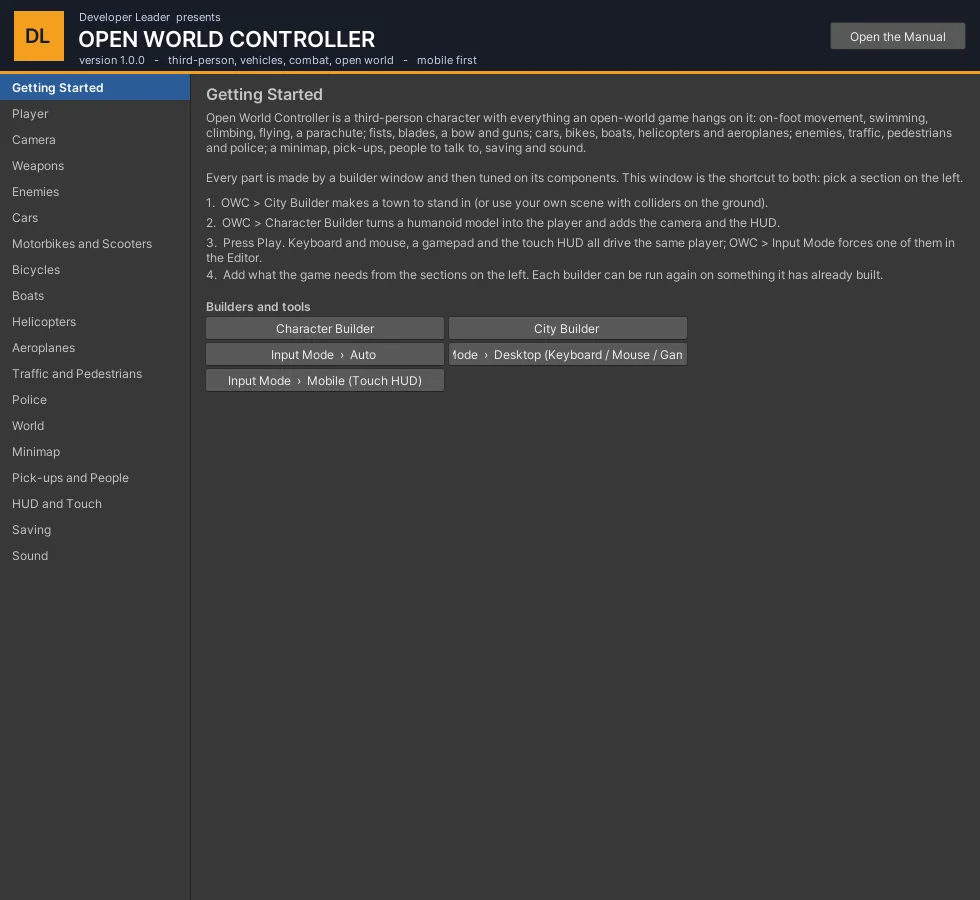
Tools > OWC > Open World Controller Hub (also under Window > OWC). The list on the left is every part of the package. For the part you pick, the right side shows:
- what it is and a couple of things worth knowing;
- Builders and tools - buttons that open the windows that make it;
- In the open scene - a drop-down of the objects of that kind in the scene, with Select and Frame in Scene view;
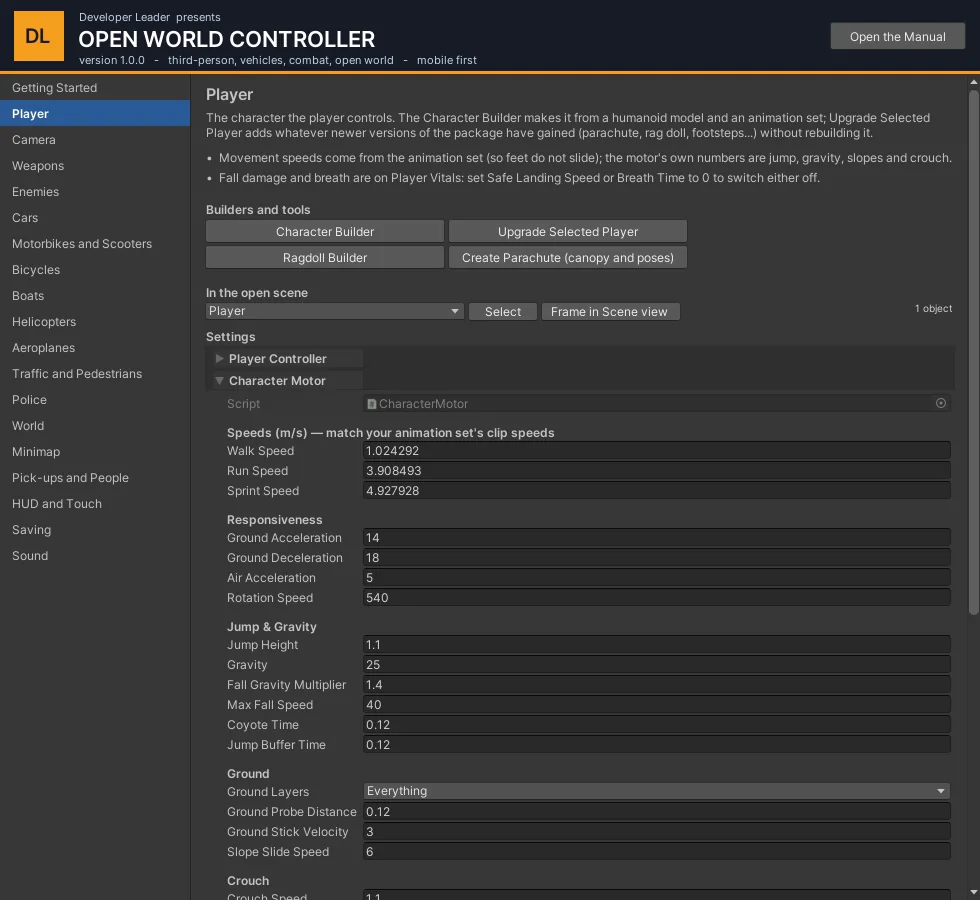
- Settings - the components of the chosen object, each one unfolding to its full inspector. Changing a value here is the same as changing it in the Inspector (Undo works, prefab overrides are marked);
- for data-driven parts (weapons, dialogue, footsteps), the assets in the project to click through to.
4Controls#
Gameplay code never reads a device. One PlayerInputState is filled each frame by whichever provider is active, so the three columns below always do the same thing.
| Action | Keyboard and mouse | Gamepad | Touch HUD |
|---|---|---|---|
| Move / look | W A S D or arrows / mouse | Left stick / right stick | Left joystick / drag the right half |
| Jump | Space | A (south) | JUMP |
| Sprint / walk | Left Shift / X | Left stick press | SPRINT |
| Crouch | C or Left Ctrl | Right stick press | CROUCH |
| Use (get in, pick up, talk) | E | X (west) | USE |
| Attack / fire | Left mouse | Right trigger | ATTACK |
| Block / aim down sights | Right mouse | Left trigger | BLOCK (reads ADS with a gun or bow) |
| Heavy attack | F or middle mouse | Right shoulder | HEAVY |
| Dodge | Left Alt | B (east) | DODGE |
| Reload | R | Y (north) | RELOAD |
| Next / previous weapon | Q / Z | D-pad right / left | SWAP |
| Draw or put away the weapon | 1 | D-pad down | WEAPON |
| Inventory | I or Tab | Select | BAG |
| Fly (take off / land) | V | D-pad up | FLY (reads LAND in the air) |
| Laser eyes | G | Left shoulder | LASER |
The same buttons in other situations
| Where | Jump | Crouch | Stick |
|---|---|---|---|
| Flying | Up (touch: UP) | Down (touch: DOWN) | Move; forward while looking up climbs. Sprint + forward = fast flight where the camera looks. |
| Free fall | Open the parachute (touch: CHUTE) | - | Slide sideways through the air |
| Under the parachute | - | Cut away (touch: CUT) | Left / right turn, forward dive, back brake |
| Swimming | Up (touch: UP) | Dive / down (touch: DIVE) | Swim; under water you go where the camera looks |
| Car, bike, boat | Handbrake | - | Throttle / brake and steering. Sprint = wheelie on bikes that can. |
| Helicopter | Climb | Sink | Forward / back and turn |
| Aeroplane | Nose up | Nose down | Forward opens the throttle, back closes it (and brakes on the ground); left / right bank |
In any vehicle Use gets out: a step if it is standing, a bail-out if it is moving, a jump if it is in the air.
5The player#
Building one - the Character Builder#
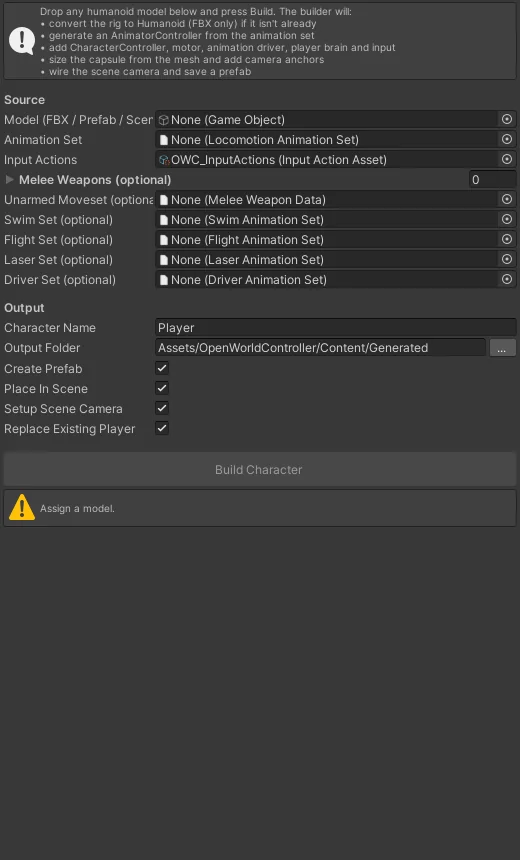
- Drop a humanoid model (scene object, prefab or FBX) into Model.
- Assign a Locomotion Animation Set (Create > OWC > Locomotion Animation Set: idle, walk, run, sprint, jump, fall, land, and optionally crouch and a climb).
- Optional sets add abilities: Swim, Flight, Laser, Driver. Optional weapons add their attack states.
- Press Build. You get the player object, a generated Animator Controller, the camera rig and a prefab in the output folder.
The Animator Controller is generated from the sets and weapons. Do not edit it by hand: change the set and build again.
Upgrade Selected Player (Hub > Player) adds anything newer versions of the package have gained - parachute, footsteps, rag doll, saving - without rebuilding.
Movement - Character Motor#
| Setting | What it does |
|---|---|
| Walk / Run / Sprint Speed | Normally taken from the animation set so the feet do not slide; the numbers here are used when the set has none. |
| Ground Acceleration / Deceleration, Air Acceleration, Rotation Speed | How quickly it picks up speed, stops, steers in the air and turns to face where it is going. |
| Jump Height, Gravity, Fall Gravity Multiplier, Max Fall Speed | The jump and the fall. Coyote Time lets a jump still count just after walking off an edge; Jump Buffer Time remembers a press just before landing. |
| Slope Slide Speed, Ground Layers | How fast it slides down a slope too steep to stand on, and what counts as ground. (Slope Limit and Step Offset are on Unity's Character Controller.) |
| Crouch Height Ratio, Crouch Speed | How low and how fast when crouched. |
| Rotation Mode (Player Controller) | Face Movement for free running, Face Look Direction for strafing (used automatically while aiming). |
Health, falling and breath - Player Vitals and Health#
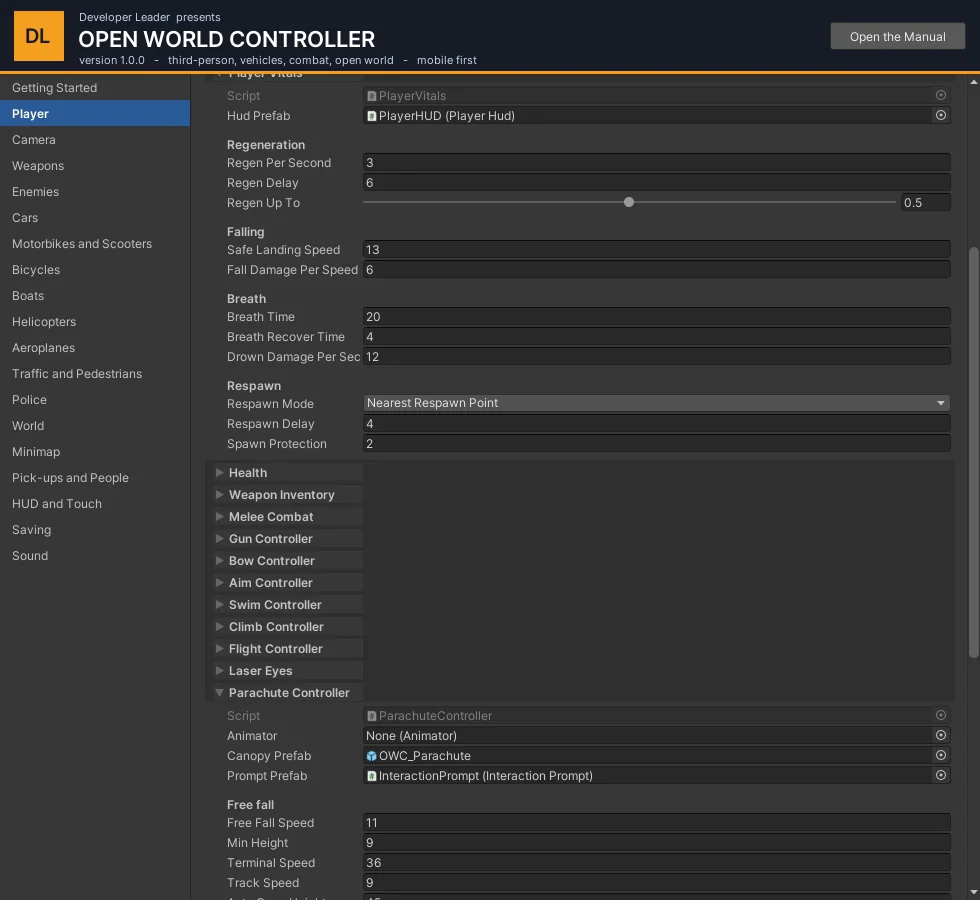
| Setting | What it does |
|---|---|
| Max Health, Team (Health) | Hit points, and the side this character is on: characters on the same team do not hurt each other. |
| Regen Per Second / Delay / Up To | Health comes back by itself after a quiet spell, up to a share of the bar. 0 per second = never. |
| Safe Landing Speed, Fall Damage Per Speed | Landing faster than the safe speed (13 m/s is a drop of about 8.5 m) costs this much per m/s over it. Safe speed 0 switches fall damage off. Water and a parachute always save a fall. |
| Breath Time, Breath Recover Time, Drown Damage Per Second | Seconds under water before drowning starts, seconds at the surface to recover, and how fast health goes after that. A blue bar appears under the health bar while breath is not full. Breath Time 0 = never drowns. |
| Respawn Mode, Delay, Spawn Protection | Where the player comes back (the nearest Respawn Point, where they died, or the start), how long after, and how long they cannot be hurt. |
6The camera#
One Camera Rig does everything: it orbits the player, keeps out of walls, tightens over the shoulder to aim, goes down the sights of a gun, and glides out to a vehicle when the player gets in. No Cinemachine is needed.
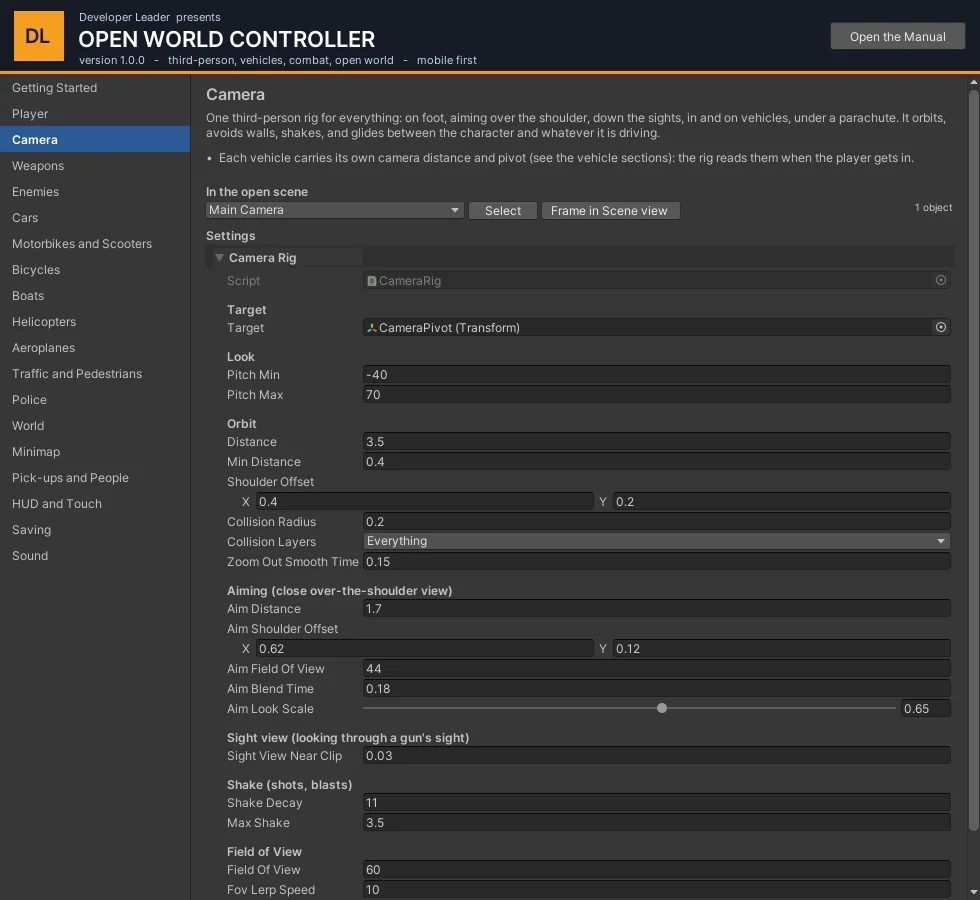
| Setting | What it does |
|---|---|
| Distance, Shoulder Offset, Field Of View | Where the camera sits behind the player, and how wide it sees. |
| Pitch Min / Max | How far it can look up and down. (Look speed is on the input providers: mouse, stick and touch each have their own sensitivity.) |
| Collision Layers, Collision Radius, Min Distance | What it will not pass through and how close it may come. |
| Aim Distance, Aim Shoulder Offset, Aim Field Of View, Aim Look Scale | The over-the-shoulder view while Aim is held, and how much slower the look is while aiming. |
| Max Shake, Shake Decay | The limit and the fade of camera shake (recoil, explosions). |
Each vehicle carries its own Camera Pivot and Camera Distance (on its Vehicle component); the rig reads them when the player gets in, and swings back behind the vehicle when the look control is left alone.
7Weapons and the inventory#
Every weapon is an asset. Melee Weapon Data covers fists and blades (model, grip, combos, block, dodge, hit windows). Bow and Gun Weapon Data extend it with what they need. The Hub's Weapons section lists every weapon asset in the project.
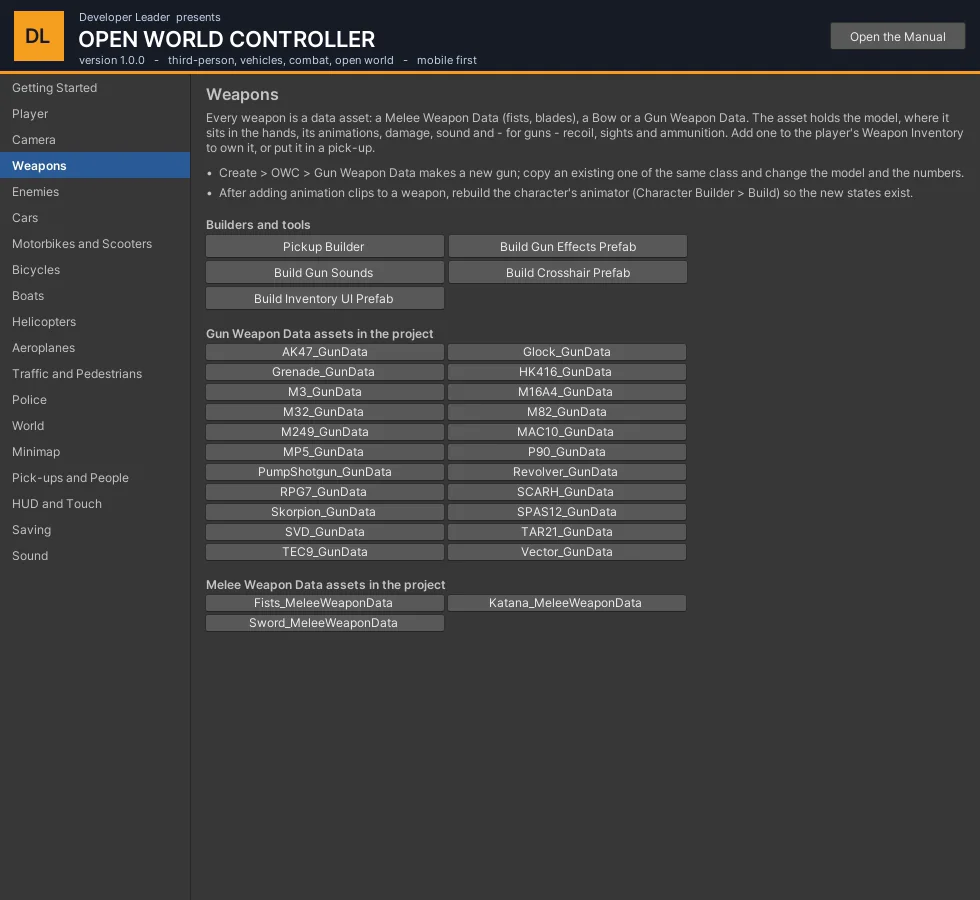
Guns#
| Group on the asset | What is in it |
|---|---|
| Model and hold | The gun's prefab, where the hands grip it, and the pose set (rifle or pistol clips, or IK only). |
| Fire | Automatic or single, rounds per minute, damage, range, pellets (shotguns), spread from the hip and in the sights. |
| Projectile | Left empty the gun is hitscan. Launchers and grenades fire a projectile with a blast radius. |
| Recoil and feel | Kick, spring back, camera shake, whether a casing is thrown. |
| Sights | Sight anchor, field of view and whether the red-dot picture is drawn. |
| Sound | Fire, reload start, reload end, dry trigger. |
| Ammunition | Magazine size, rounds carried at the start, reload time. |
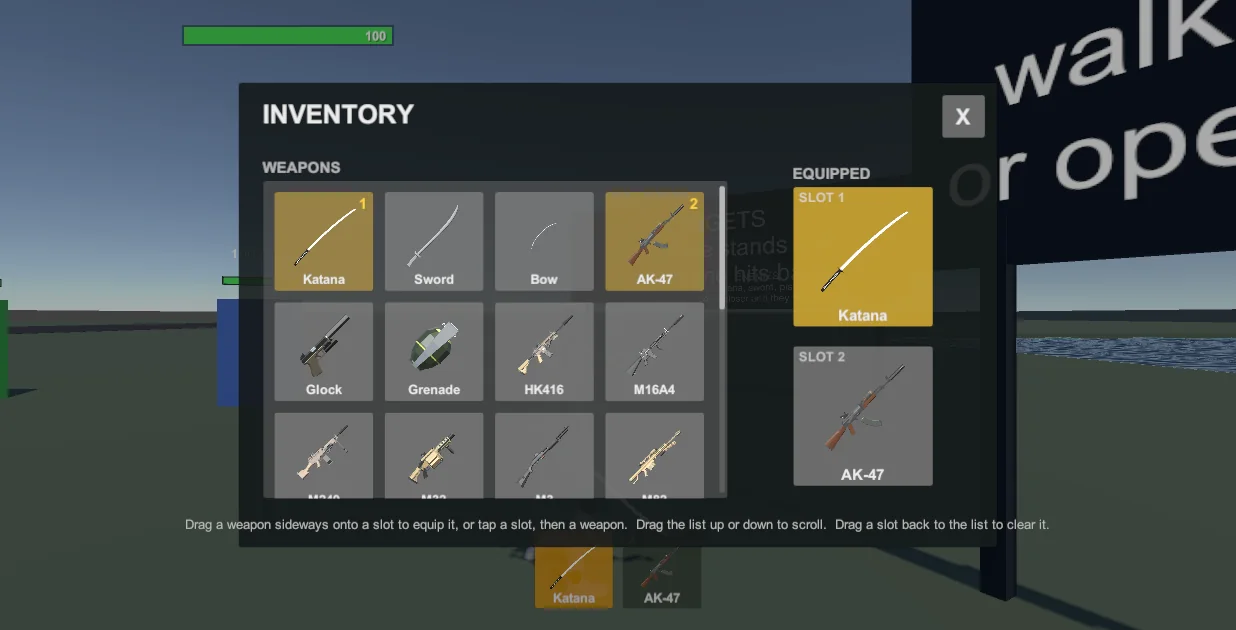
The inventory#
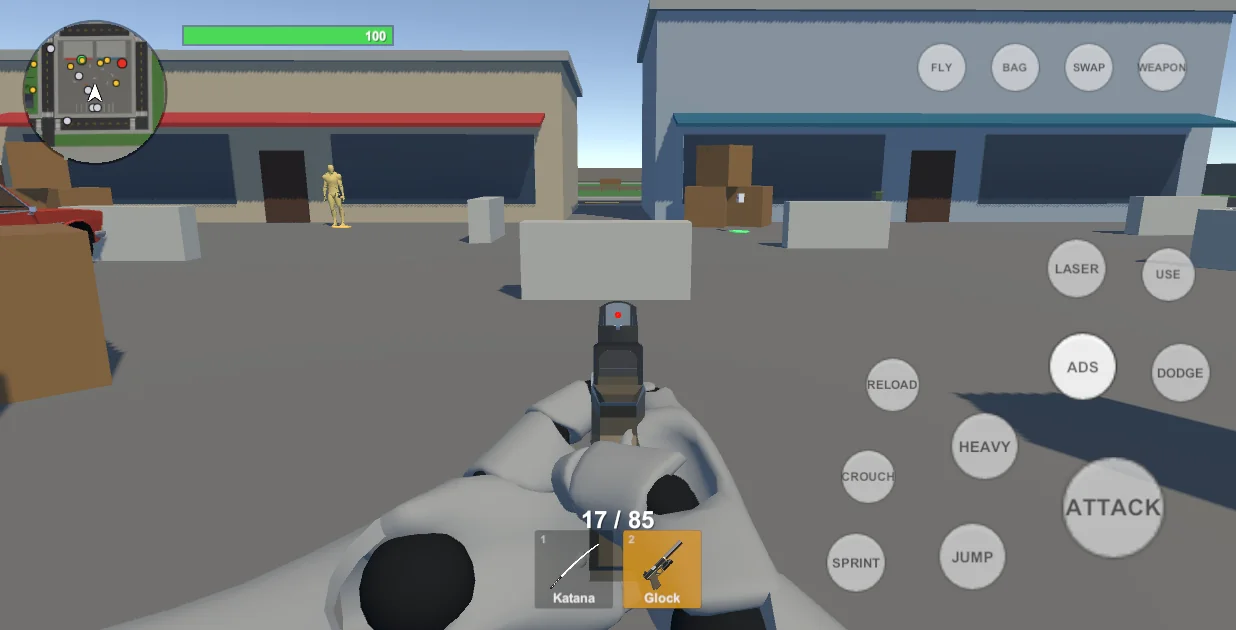
Weapon Inventory on the player holds what is owned (Owned) and what starts in the two slots (Start Equipped). The quick bar at the bottom of the screen shows the slots; BAG / I opens the full list.
Adding a new gun#
- Duplicate the Gun Weapon Data of a gun of the same class.
- Change the model, the grip points and the numbers.
- Add it to the player's Owned list, or put it in the world with the Pickup Builder.
- If it uses clips the character does not have yet, press Build in the Character Builder so the Animator gets the states.
8Swimming, climbing, flying, the parachute#
Swimming - Swim Controller#
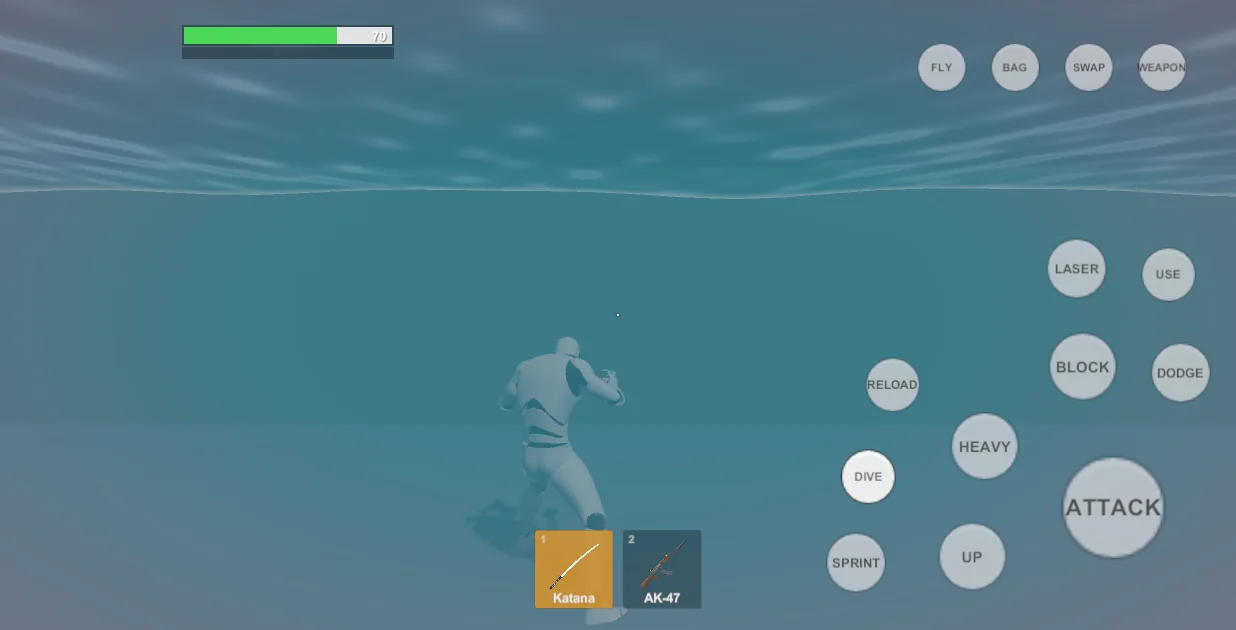
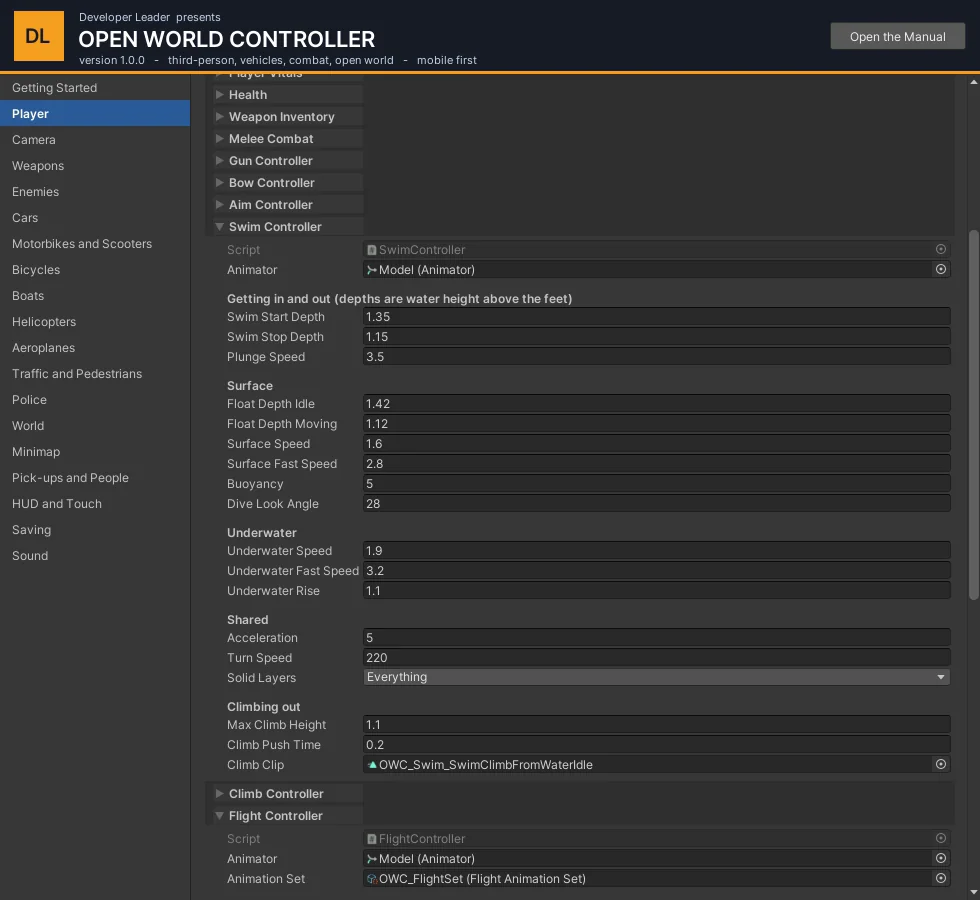
Any Water Volume can be swum in. The character floats at the surface, dives with Crouch (or by pushing forward while looking down), swims in three dimensions under water, and climbs out over a low ledge. Let go under water and it floats back up.
| Setting | What it does |
|---|---|
| Swim Start / Stop Depth | How deep the water must be on the character to start swimming, and how shallow to stand again. |
| Surface Speed / Fast Speed | Swimming on the surface, and with Sprint held. |
| Underwater Speed / Fast Speed, Underwater Rise | Under water. Rise is how fast it floats up with the controls let go (0 = stays at its depth). |
| Dive Look Angle | How far down the camera must look for "forward" to mean "dive". |
| Max Climb Height | The tallest bank it can pull itself out over. |
Vaulting and climbing - Climb Controller#
Jump at a low wall to vault it (sprinting into one vaults by itself when Auto Vault When Sprinting is on); a higher ledge within reach is climbed. Vault Max Height, Vault Max Depth and Climb Max Height set the limits.
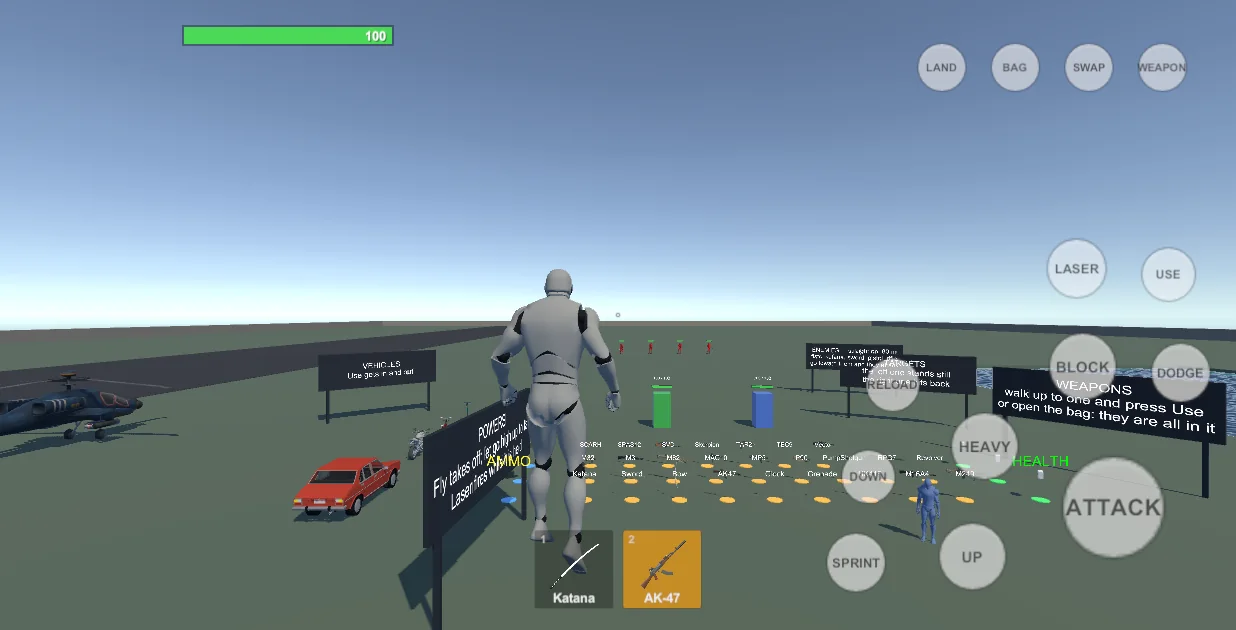
Flight and laser eyes - Flight Controller, Laser Eyes#
| Setting | What it does |
|---|---|
| Hover Speed, Hover Vertical Speed | Sideways and up / down speed while hovering. |
| Hover Look Climb | 1 = pushing forward while looking up climbs as steeply as the look; 0 = height only from Jump and Crouch. |
| Takeoff Rise Time | Seconds of automatic climb after taking off from the ground. |
| Fast Speed, Max Pitch, Max Bank | Fast flight (Sprint + forward): speed, and how far the body pitches and banks. |
| Auto Land Height | Pressing Fly with the ground this close lands; higher up it lets go and the character falls. |
Free fall and the parachute - Parachute Controller#
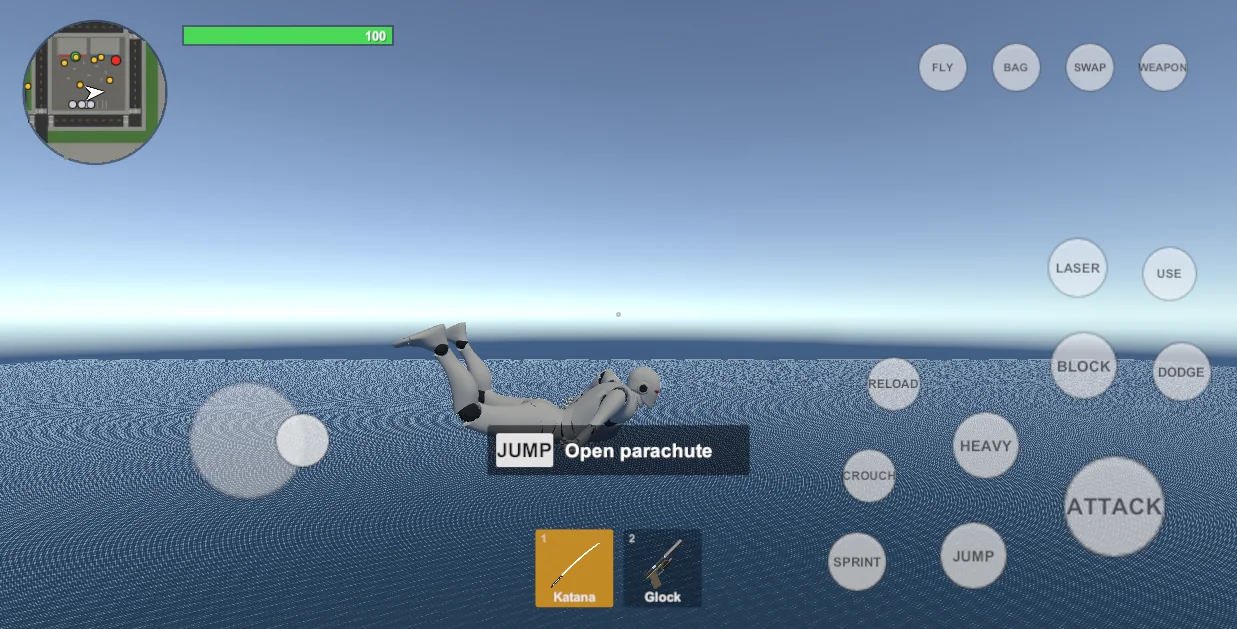
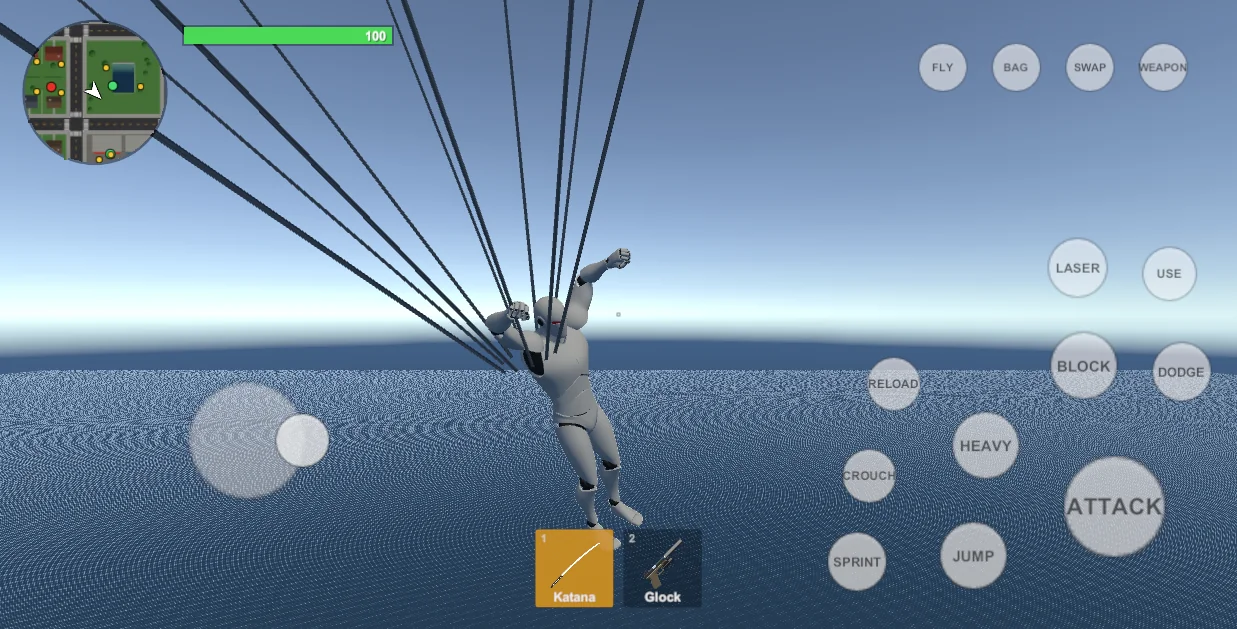
Falling fast with room below - out of an aircraft, off a roof, letting go in mid-flight - puts the character into free fall. Jump opens the canopy; left alone it opens by itself at the automatic height. Under the canopy the stick steers, dives and brakes, and Crouch cuts it away. Landing under it never hurts.
| Setting | What it does |
|---|---|
| Free Fall Speed, Min Height | How fast and with how much air below a fall becomes a free fall. |
| Terminal Speed, Track Speed | Top falling speed, and the sideways speed the stick gives in free fall. |
| Auto Open Height | The canopy opens by itself this far above the ground. 0 = only when asked. |
| Sink / Glide Speed | Hands off. Dive and Brake pairs are the same with the stick forward and back. |
| Turn Rate, Bank | How fast it turns and how far the canopy and body swing over. |
| Canopy Prefab | The canopy model. Tools > OWC > Create Parachute generates one (and the two poses); Canopy Settings in that tool change its size and colours. |
9Enemies#
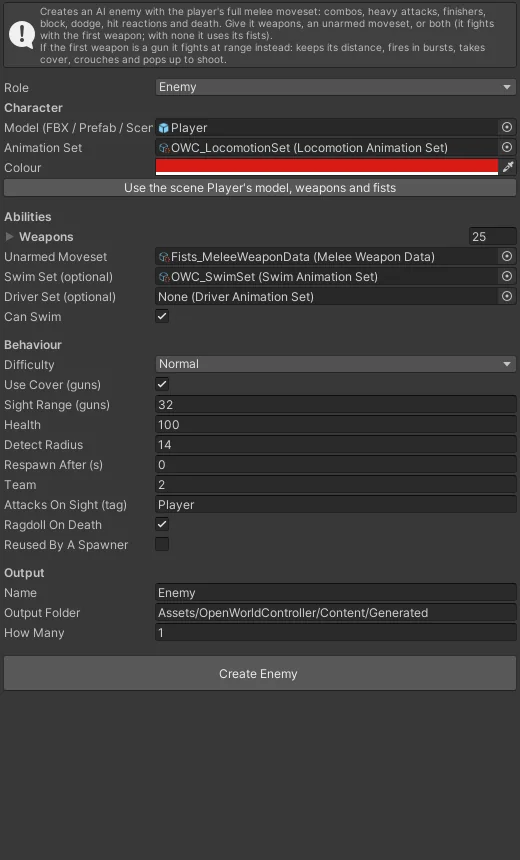
The Enemy Builder makes an enemy from a humanoid model, a Locomotion Animation Set and a weapon: a Melee Weapon Data for a brawler or swordsman, a Gun Weapon Data for a shooter. A Driver Set lets it sit in vehicles (police, traffic drivers).
What an enemy does: notices the player, chases, circles, attacks in combos with the weapon's own moves, blocks and dodges; gun enemies keep their distance, take cover at Cover Points, and reload. On death it goes limp as a rag doll and - if Respawn Delay is above 0 - comes back where it started.
Training Dummy and Attacking Dummy (Hub > Enemies) are targets to practise on.
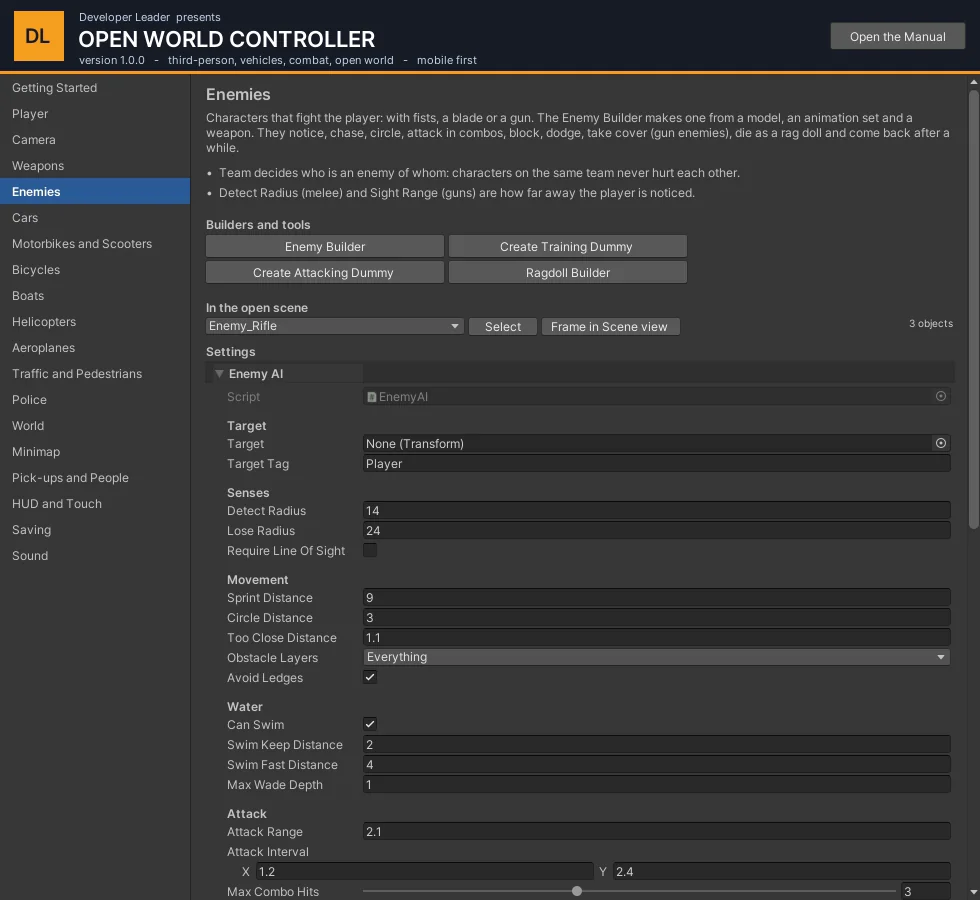
| Setting | What it does |
|---|---|
| Detect Radius, Lose Radius, Require Line Of Sight | Melee enemies: how close the player is noticed, how far before they give up, and whether a wall in between hides the player. |
| Sight Range, Preferred Range, Min Range | Gun enemies: how far they can see (they need a clear line), the distance they like to fight from, and how close before they back off. |
| Attack Range, Attack Interval, Max Combo Hits, Heavy Chance, Finisher Chance | The rhythm of a melee fight. |
| Block Chance, Dodge Chance, Reaction Time | How often and how quickly they answer the player's attacks. |
| Burst Time, Burst Pause, Aim Error, Gun Damage Scale | Gun enemies: how they shoot, how well, and how hard their bullets hit compared with the player's. |
| Use Cover, Cover Search Radius, Hide Time, Peek Time | Whether they take cover, how far they look for it, and how long they hide and lean out. |
| Respawn Delay, Remove Body After | Seconds until they come back where they started (0 = they stay dead), and how long the body lies there. |
| Team (on Health) | Same team = allies. |
10Cars#
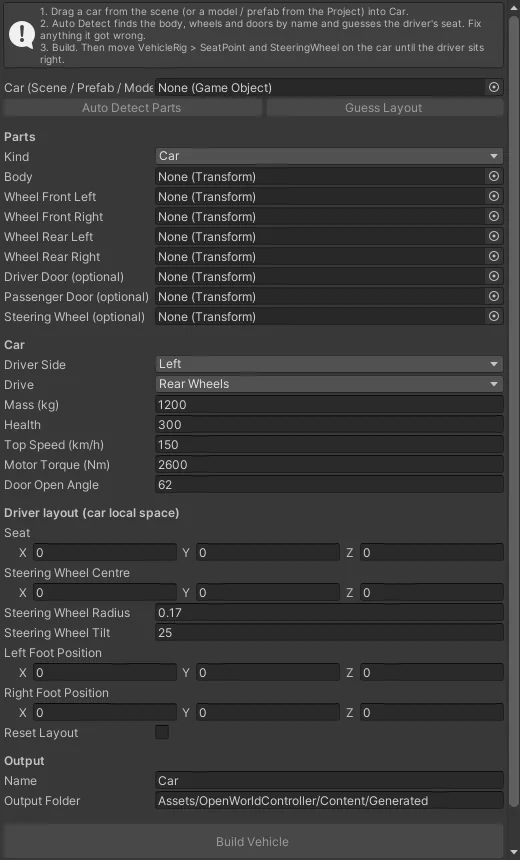
- Drag a car from the scene (or a model or prefab) into Car.
- Auto Detect Parts finds the body, the four wheels and the doors by name; Guess Layout places the driver's seat, the steering wheel and the pedals. Correct anything it got wrong.
- Choose the driver's side, the driven wheels, mass, top speed and health, and press Build.
- On the car, move
VehicleRig > SeatPointandSteeringWheeluntil the driver fits.
The player walks to a door and presses Use: the door opens, the character steps in, sits, takes the wheel, pulls the door shut. A car with somebody at the wheel can be taken - "Pull the driver out".
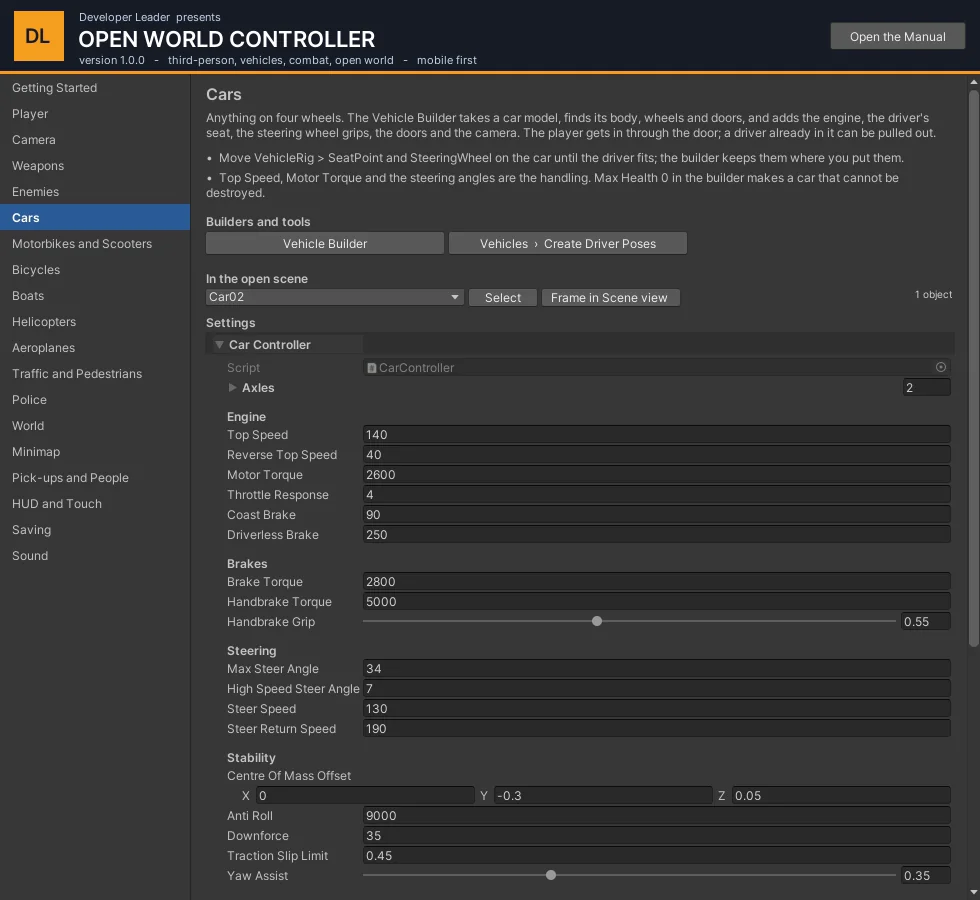
| Car Controller | What it does |
|---|---|
| Top Speed, Reverse Top Speed, Motor Torque | How fast and how hard it pulls. |
| Throttle Response, Coast Brake, Driverless Brake | How quickly the engine follows the pedal, engine braking, and how an empty car slows down. |
| Brake Torque, Handbrake Torque, Handbrake Grip | Braking, and how loose the rear goes with the handbrake on. |
| Max Steer Angle, High Speed Steer Angle, Steer Speed | Steering lock at a crawl and at speed, and how fast the wheels turn. |
| Centre Of Mass Offset, Anti Roll, Downforce, Traction Slip Limit | Stability: lower centre and more anti-roll keep it flat; the slip limit is traction control. |
| Forward / Sideways Grip | Tyres. |
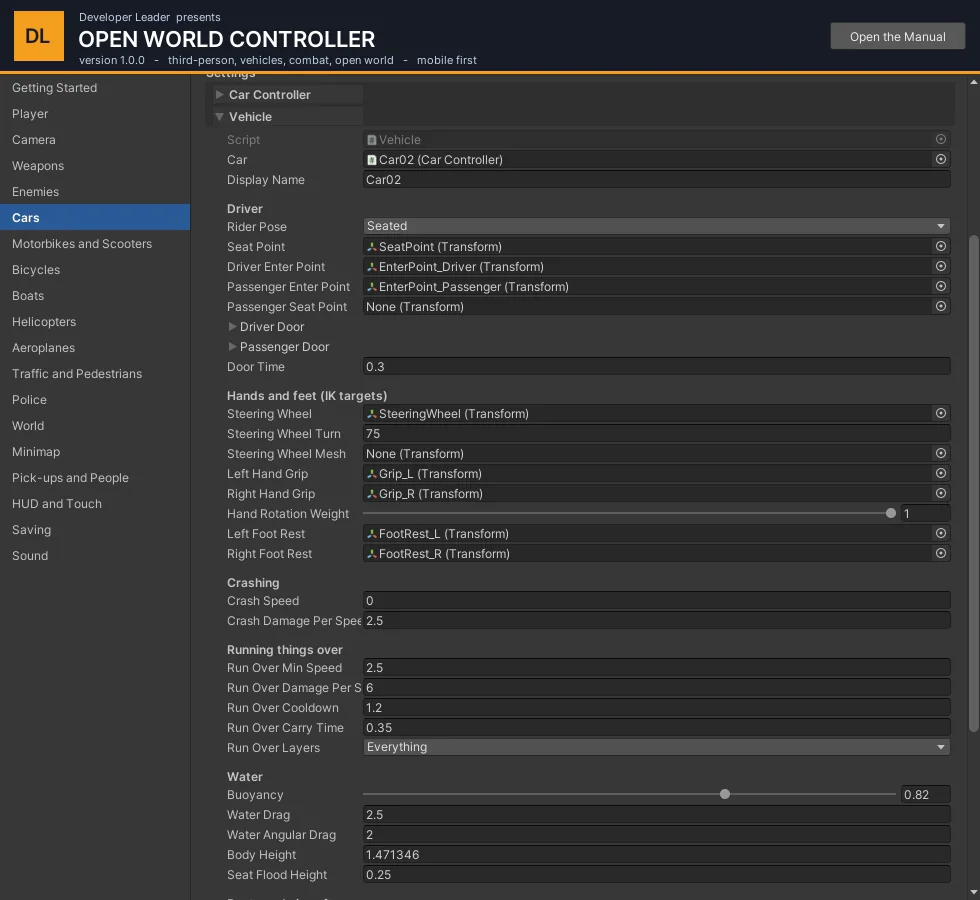
| Vehicle | What it does |
|---|---|
| Display Name | Shown in the "Enter ..." prompt. |
| Rider Pose | Seated (cars, boats, aircraft), Standing (scooter), Astride (bicycle), Motorcycle (a pack's own clips). |
| Seat Point, Enter Points, Doors | Where the driver sits and stands, which transforms are the doors and how far they open. |
| Steering Wheel, Grips, Foot Rests | What the hands and feet reach for (by IK). |
| Crash Speed, Crash Damage Per Speed | Bikes: how hard a hit throws the rider, and how much it hurts. 0 = never. |
| Run Over Min Speed, Damage Per Speed | Driving into characters. |
| Buoyancy, Seat Flood Height | In water a car sinks slowly; when the water reaches the seat the driver is put out to swim. |
| Camera Pivot, Camera Distance | The view while driving this vehicle. |
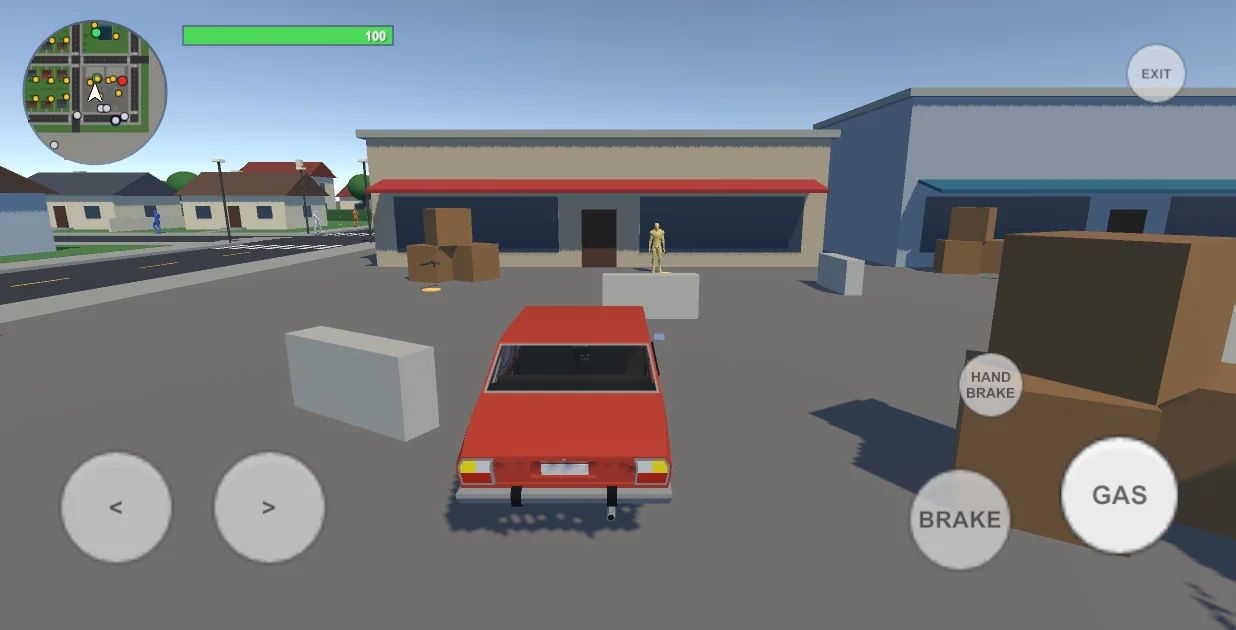
11Motorbikes, scooters and bicycles#
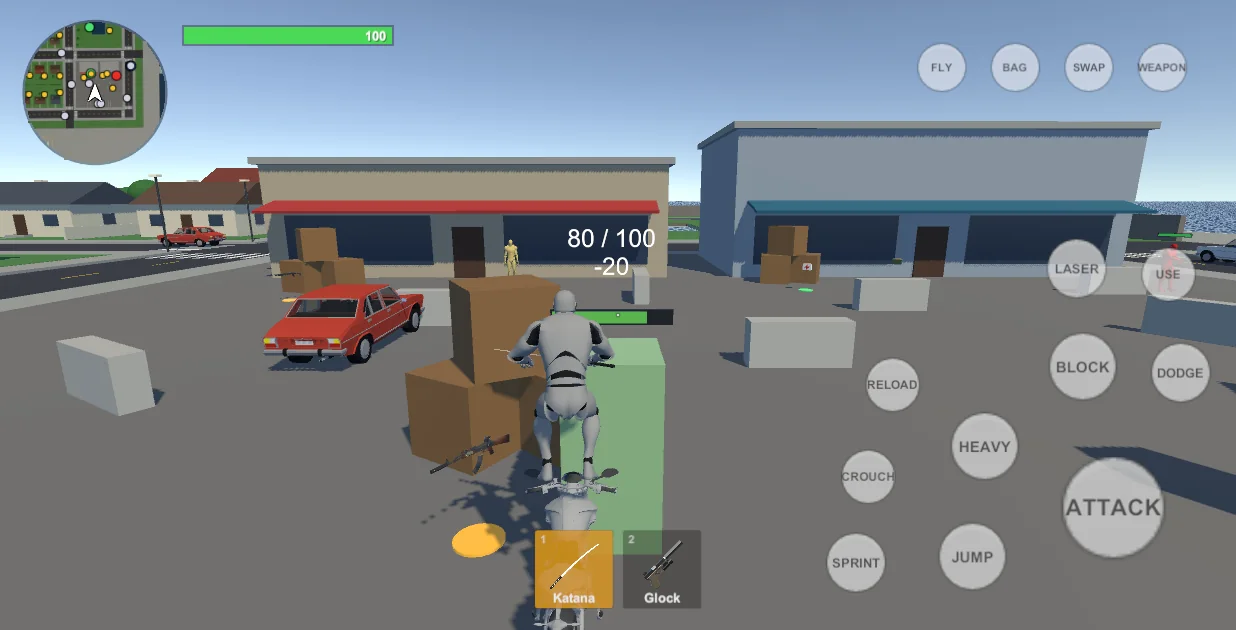
Set Kind to Bike in the Vehicle Builder. A bike is the same Car Controller with one wheel per axle and Balance on: it leans into corners by itself and cannot corner harder than its lean allows.
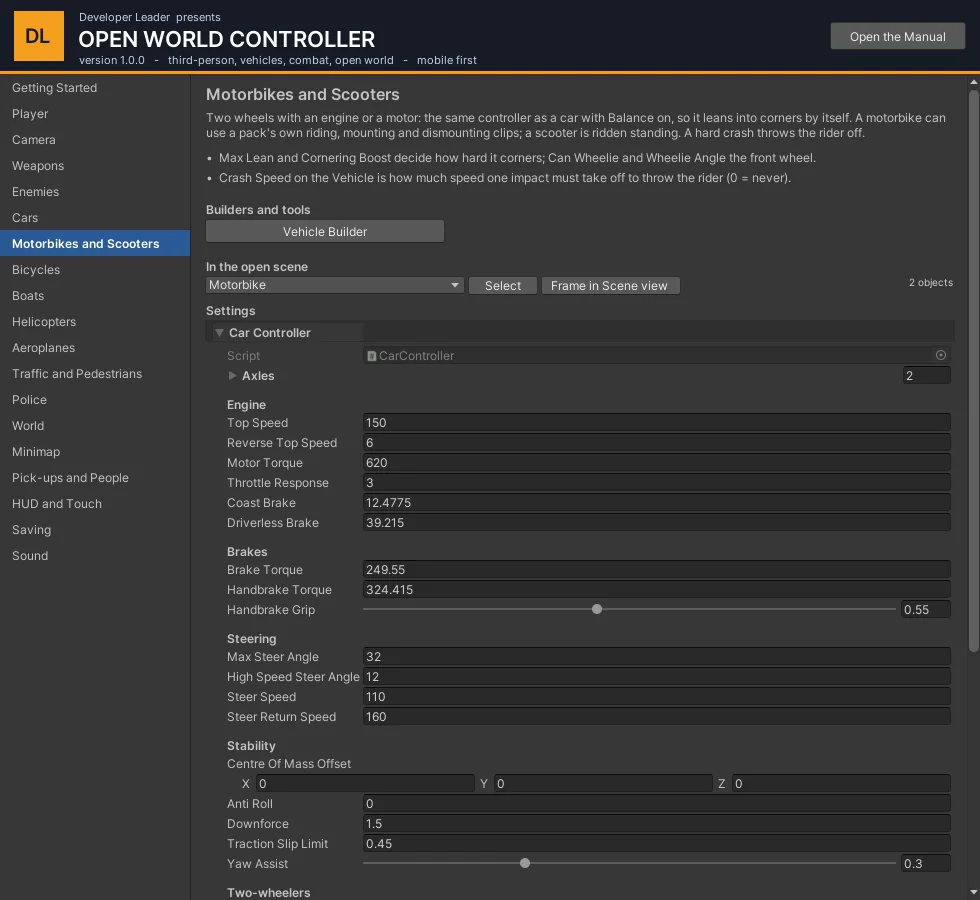
| Setting | What it does |
|---|---|
| Rider Pose (builder) | Standing for a scooter, Astride for a bicycle, Motorcycle when the Driver Animation Set has a pack's riding, mounting and dismounting clips. |
| Max Lean, Cornering Boost, Lean Response | How far it leans, how much harder than physics it may corner, how quickly it tips in. |
| Can Wheelie, Wheelie Angle, Min Speed | Sprint lifts the front wheel. |
| Crash Speed (builder / Vehicle) | Speed one impact must take off to throw the rider. |
| Enter Offset (builder) | Where the rider stands to get on, beside the bike. |
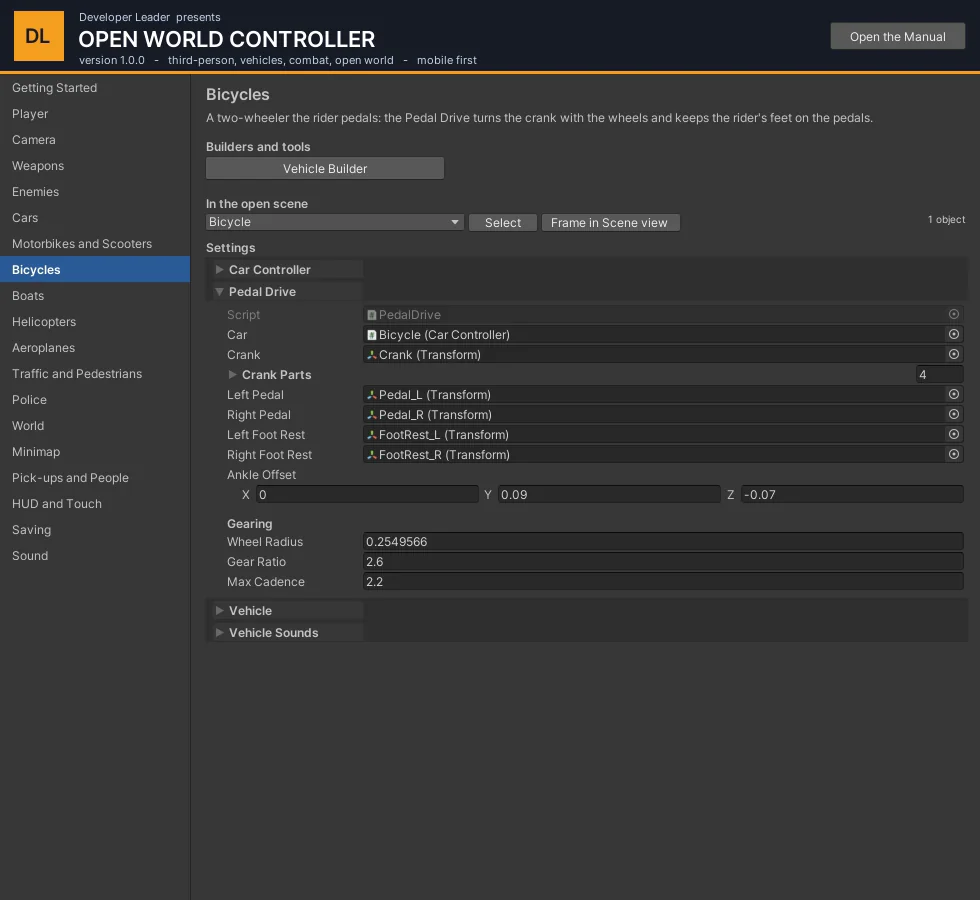
Bicycles: tick Has Pedals in the builder and give it the crank centre and the two pedal positions. Pedal Drive turns the crank with the rear wheel and moves the foot rests round with the pedals, so the rider's feet pedal. A bicycle's "engine" is the rider: give it a low Motor Torque and Top Speed.
12Boats#
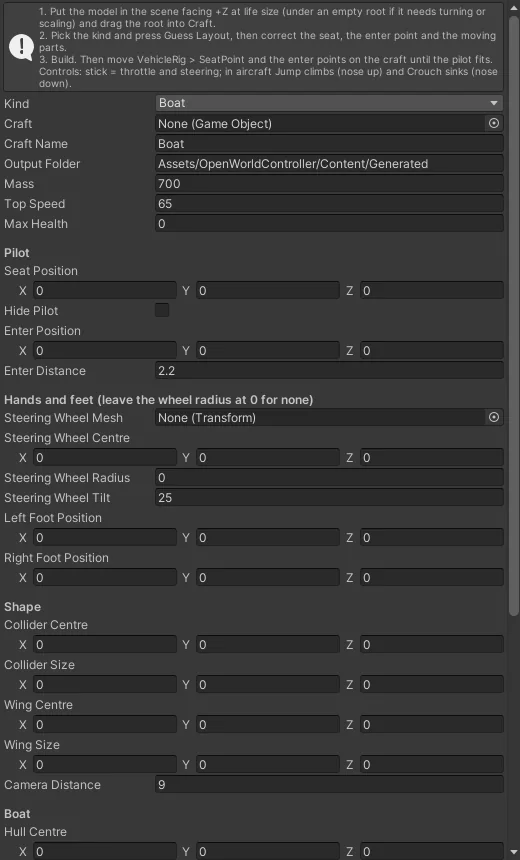
Boats, helicopters and aeroplanes are made by the Boat and Aircraft Builder.
- Put the model in the scene facing +Z, at life size, with its origin at its lowest point. If the model is not like that, put it under an empty object and turn, scale and lift the model inside it; give the builder the empty.
- Choose the Kind and press Guess Layout.
- Set the seat and the enter position; for a boat the steering wheel, its radius and the foot positions; the propeller and outboard if the model has them.
- Press Build.
These have no doors: the pilot goes straight to the seat. Hide Pilot stops drawing the character while seated, for a model with a solid canopy and no cabin.
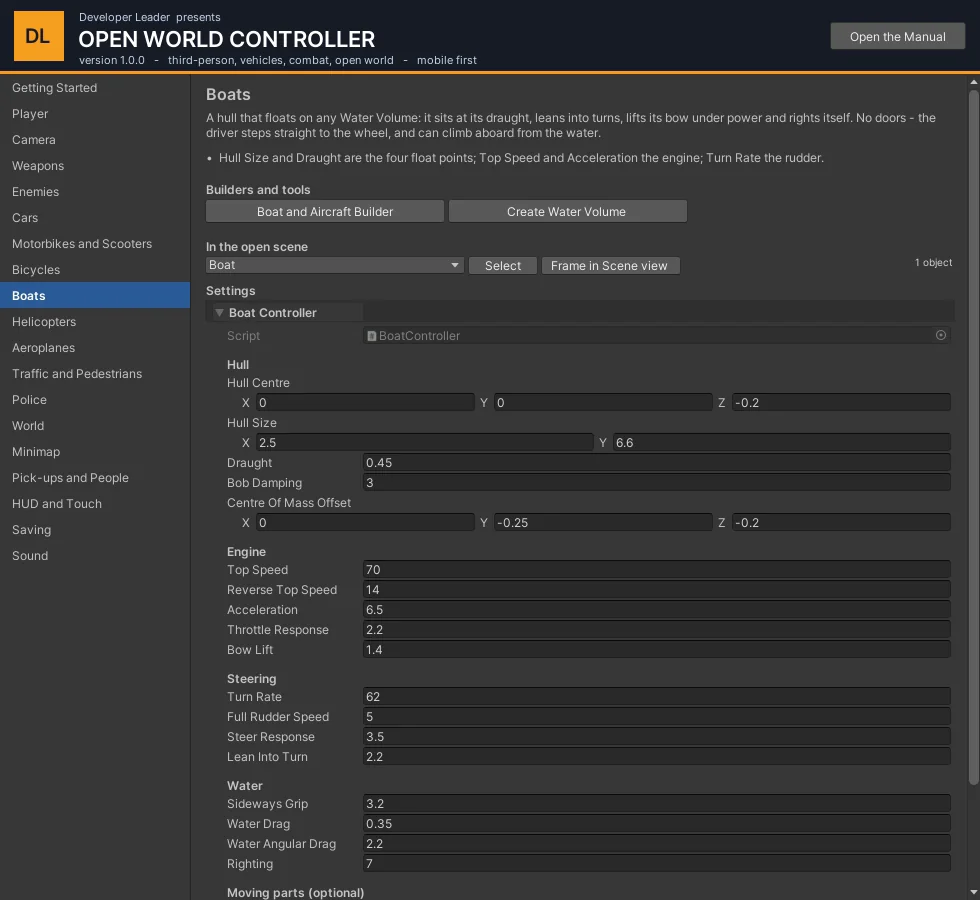
| Boat Controller | What it does |
|---|---|
| Hull Centre, Hull Size, Draught | Four float points at the corners of the hull's footprint; draught is how deep it sits. |
| Bob Damping, Righting, Centre Of Mass Offset | How quickly bobbing settles, how hard it comes back upright, and how steady it is. |
| Top Speed, Reverse Top Speed, Acceleration, Bow Lift | The engine, and how much the bow comes up under power. |
| Turn Rate, Full Rudder Speed, Lean Into Turn | A boat turns in proportion to the water going past: standing still it barely turns. |
| Sideways Grip, Water Drag | The keel, and how fast it loses way with the engine off. |
| Propeller, Outboard | Optional moving parts. |
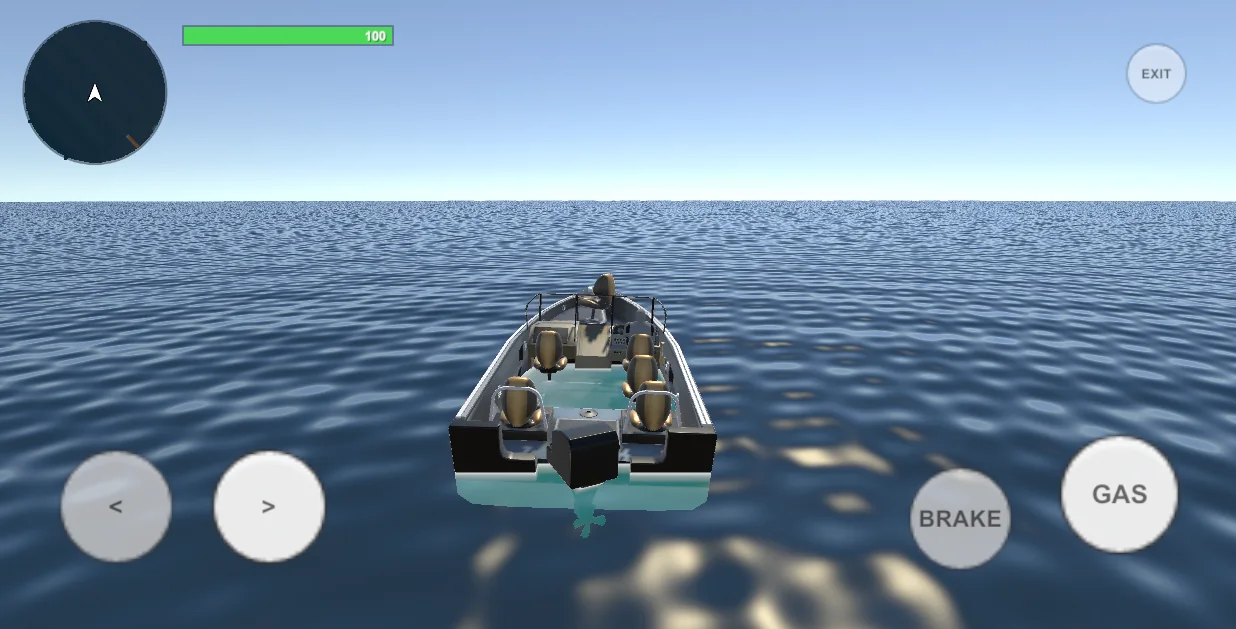
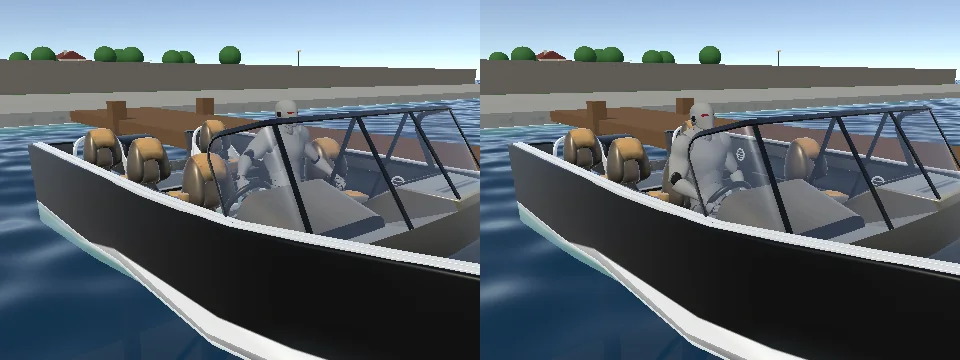
A swimmer beside a boat can climb aboard with Use. Getting out with nothing to stand on puts the driver in the water.
13Helicopters#
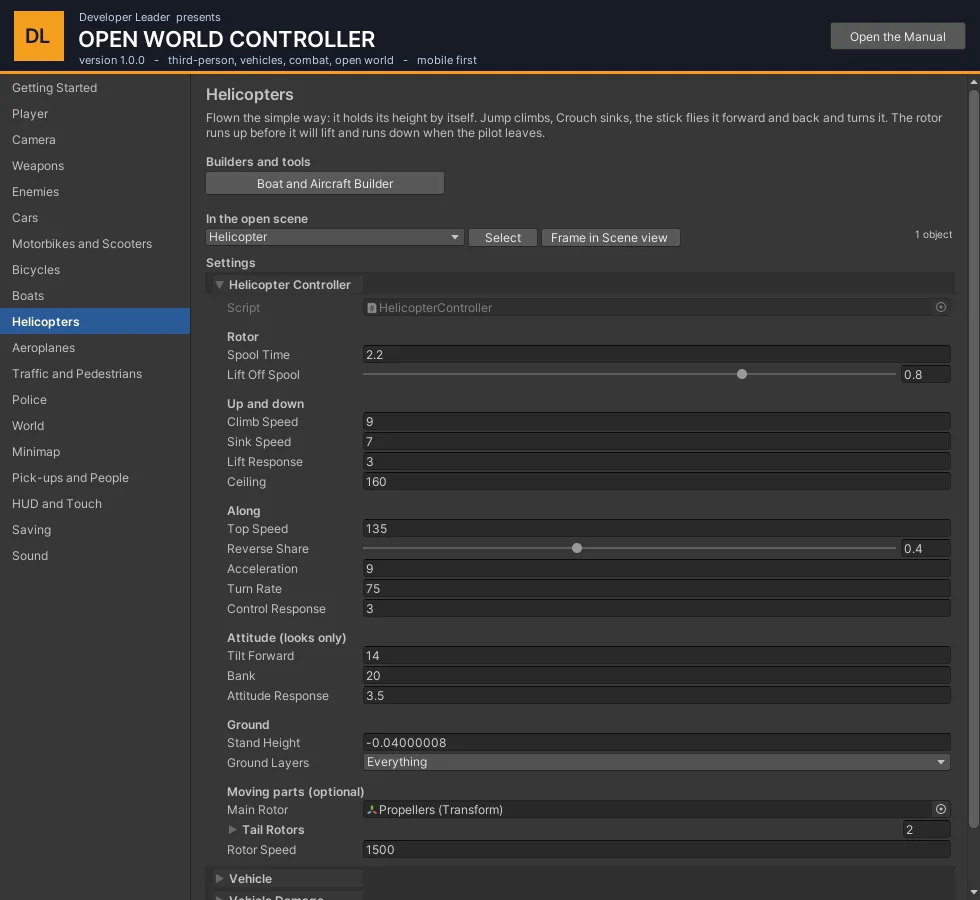
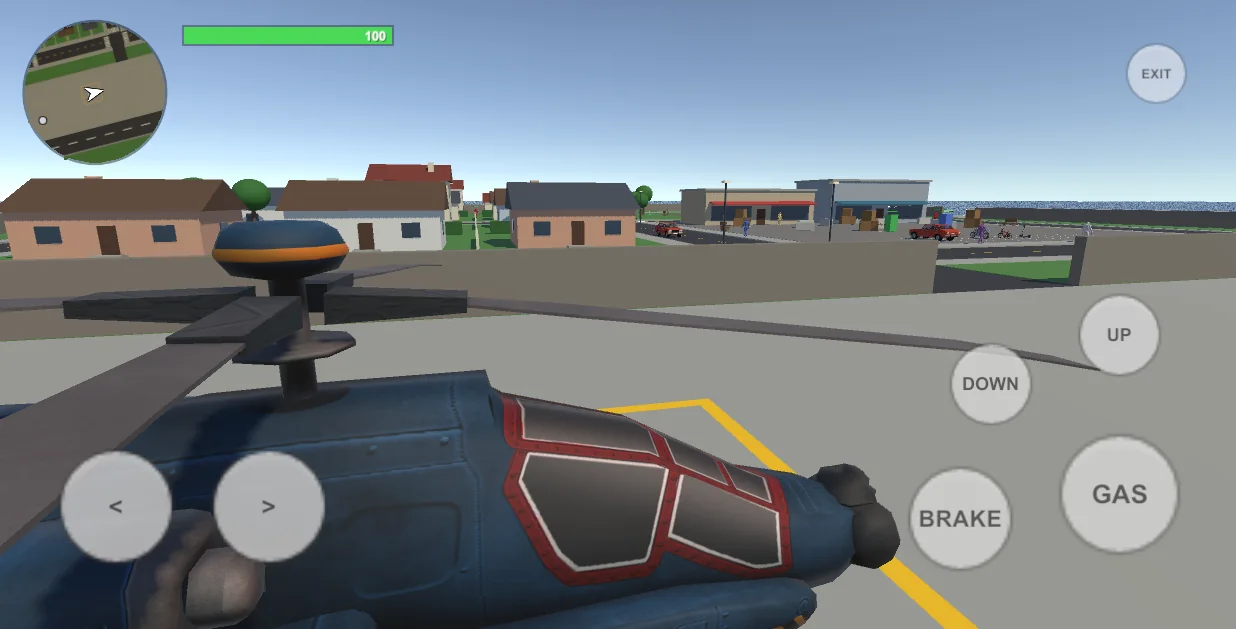
Flown the simple way: it holds its height by itself, so there is nothing to balance. The rotor runs up before it will lift, and runs down when the pilot leaves - a helicopter abandoned in the air comes down.
| Helicopter Controller | What it does |
|---|---|
| Spool Time, Lift Off Spool | Seconds for the rotor to run up, and how fast it must turn before it lifts. |
| Climb Speed, Sink Speed, Lift Response | Up and down, and how firmly it holds the height it is asked for. |
| Ceiling | The height it will not climb above. |
| Top Speed, Reverse Share, Acceleration, Turn Rate | Forward, backward and turning. |
| Tilt Forward, Bank | How far the body dips and banks. These are looks only. |
| Main Rotor, Tail Rotors, Rotor Speed | The spinning parts. |
14Aeroplanes#
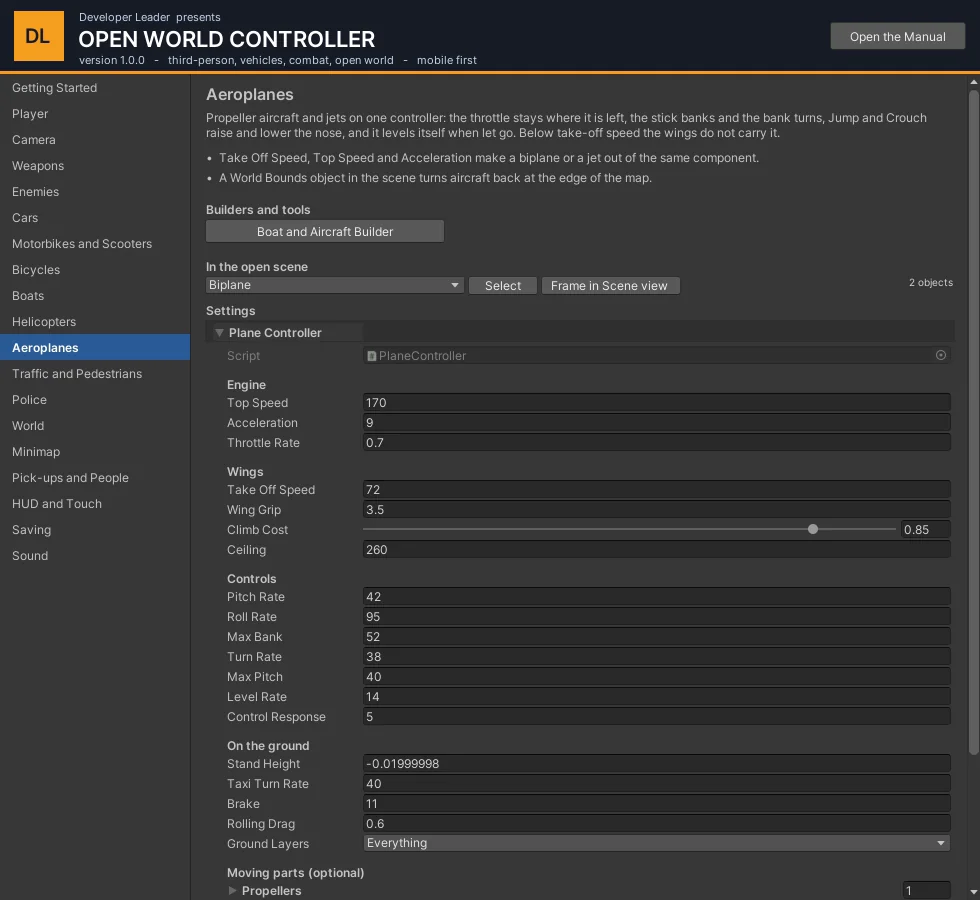
One controller for propeller aircraft and jets. The wings carry more the faster it goes: below take-off speed it will not leave the ground (or stay in the air), at and above it the aeroplane goes where it points. Let go of the stick and it levels itself.
| Plane Controller | What it does |
|---|---|
| Top Speed, Acceleration, Throttle Rate | The engine. The throttle is a lever: it stays where it is left. |
| Take Off Speed | The speed at which the wings carry the whole weight. Lower = shorter runway. |
| Wing Grip, Climb Cost | How firmly it follows its nose, and how much climbing costs in speed. |
| Pitch Rate, Roll Rate, Max Bank, Turn Rate, Max Pitch | The controls. |
| Level Rate | How fast the nose returns to level with the stick let go. 0 = it stays. |
| Taxi Turn Rate, Brake, Rolling Drag | On the ground. |
| Ceiling | Maximum height. |
| Propellers, Propeller Axis, Speed | Spinning parts. |
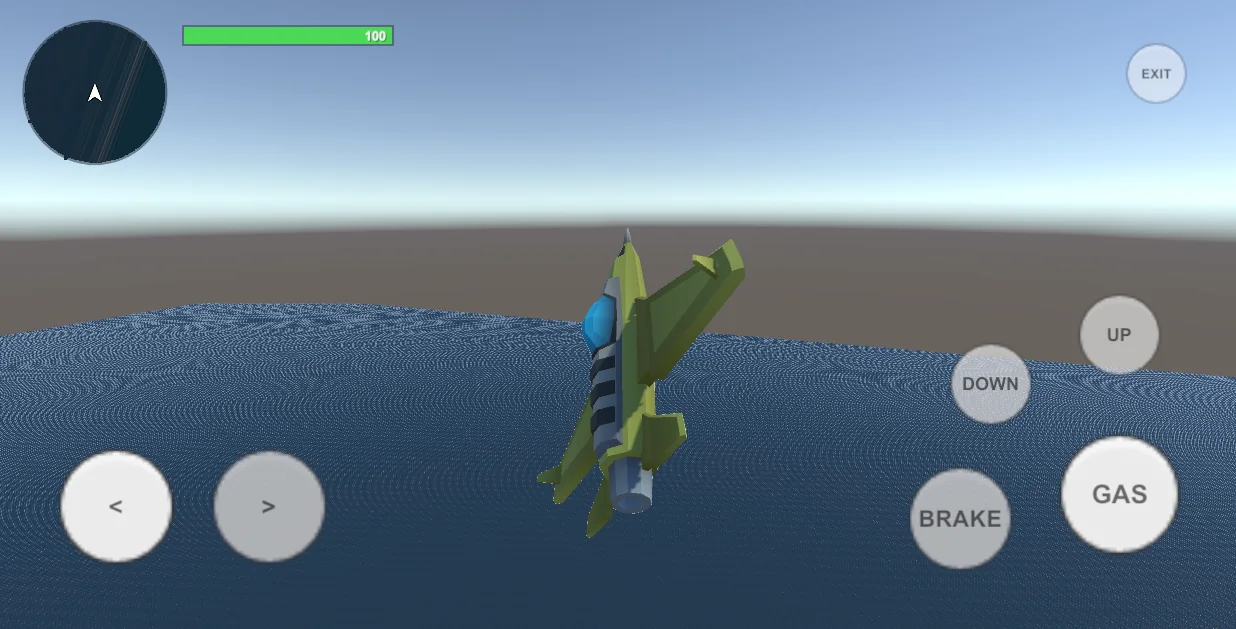
World Bounds (an empty object with the component, Radius in metres) is the edge of the map for aircraft: an aeroplane that passes it banks itself round toward the middle, a helicopter will not fly further out.
15Vehicle damage and vehicle sound#
Vehicle Damage#
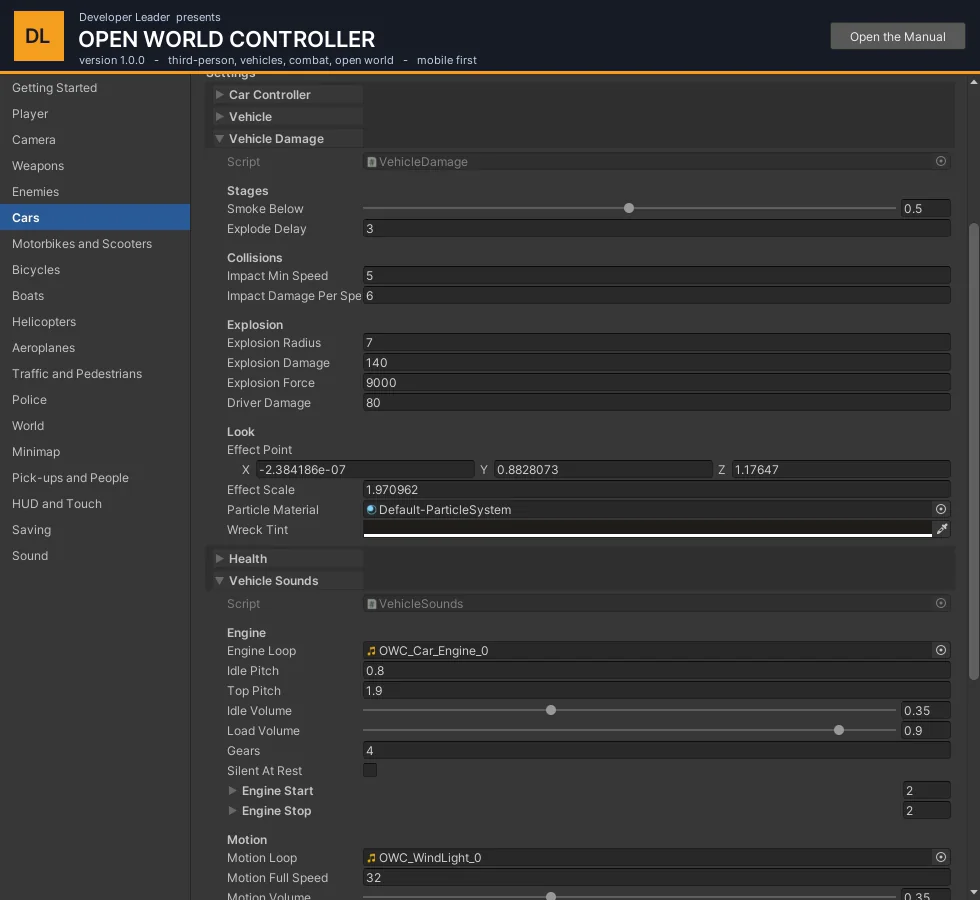
Added by the builders when Max Health is above 0. Bullets, blasts and collisions take health off; below Smoke Below it smokes; at zero it burns for Explode Delay seconds and then explodes, throwing the driver clear and leaving a blackened wreck.
| Setting | What it does |
|---|---|
| Impact Min Speed, Impact Damage Per Speed | How hard a crash must be to hurt the vehicle, and how much. |
| Explosion Radius / Damage / Force, Driver Damage | The blast. |
| Effect Point, Effect Scale | Where smoke and fire come from (the engine) and how big. |
Vehicle Sounds#
Every slot is optional. The engine loop's pitch follows how fast the engine is turning and its loudness how hard it is working; Gears makes the pitch climb and drop back on the way to top speed (0 for electric motors, boats and aircraft); Silent At Rest is for a bicycle's freewheel or an electric motor. The motion loop is whatever the going makes - wind, a boat's wash (tick Motion Only In Water). Then: skid, fire, door, engine start and stop, light and heavy impacts, splash.
The package generates placeholder loops for a rotor, a jet, an electric motor and a freewheel (Tools > OWC > Build World Sounds); replace them with recordings.
16The world: city, water, sea#
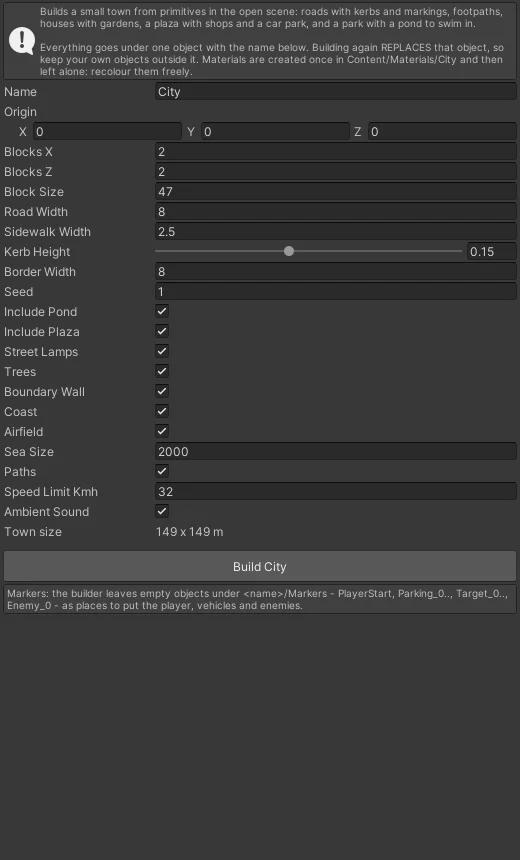
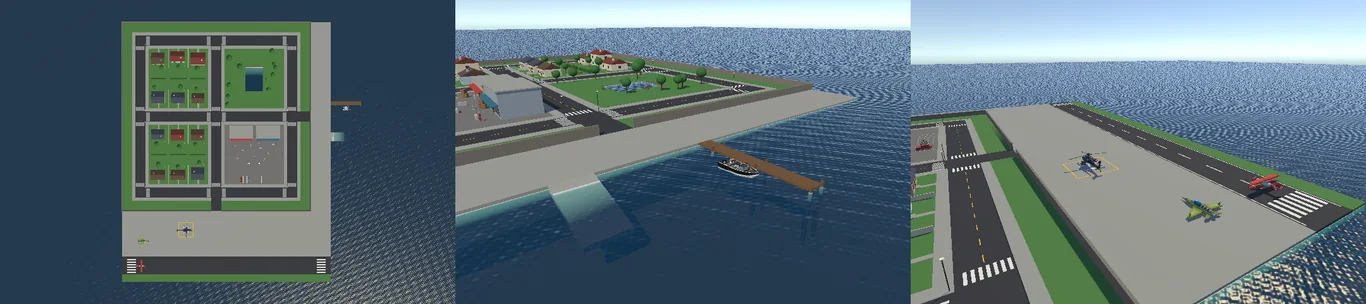
The City Builder makes a town out of primitives - cheap to draw, easy to replace piece by piece with your own art.
| Setting | What it does |
|---|---|
| Blocks X / Z, Block Size | How many city blocks and how big. |
| Road Width, Sidewalk Width | Streets. |
| Include Pond / Plaza | A park with a pond, a plaza with shops. |
| Boundary Wall | A wall round the town. |
| Coast | Sea all round, with a quay, a jetty and a slipway on the east side. |
| Airfield | A runway, an apron and a helicopter pad to the south. |
| Paths | Draws the footpaths and traffic lanes for you. |
| Seed | A different town from the same settings. |
The builder leaves markers under City/Markers (PlayerStart, Parking_n, Mooring_0, Helipad_0, PlaneStand_n, Pickup_n ...) to place things on.
Water#
Tools > OWC > Create Water Volume makes a box of water: the top of the box is the surface. Characters swim in it, boats float on it, cars sink in it, and the camera goes blue below it. Underwater Fog Colour / Density on the volume set that look. The surface is drawn by the OWC/Water shader; Cell Size on the Water Surface trades wave smoothness for vertices (use a large cell for a sea).
17Traffic and pedestrians#
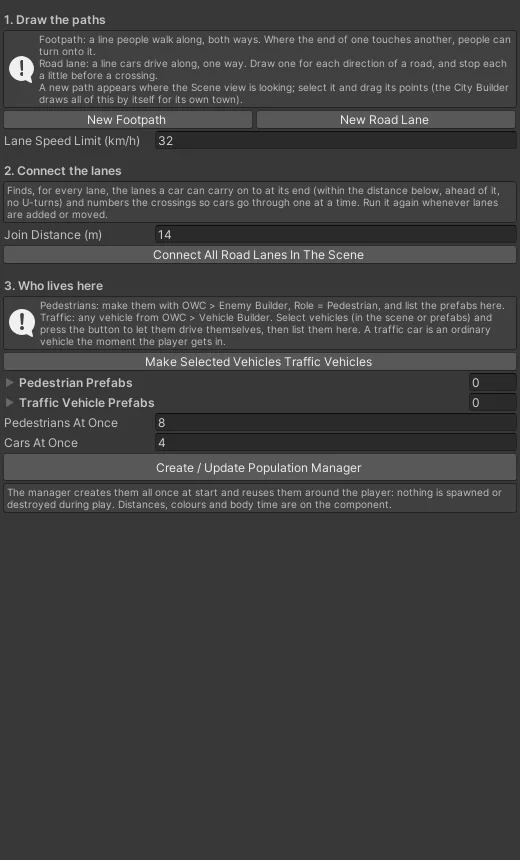
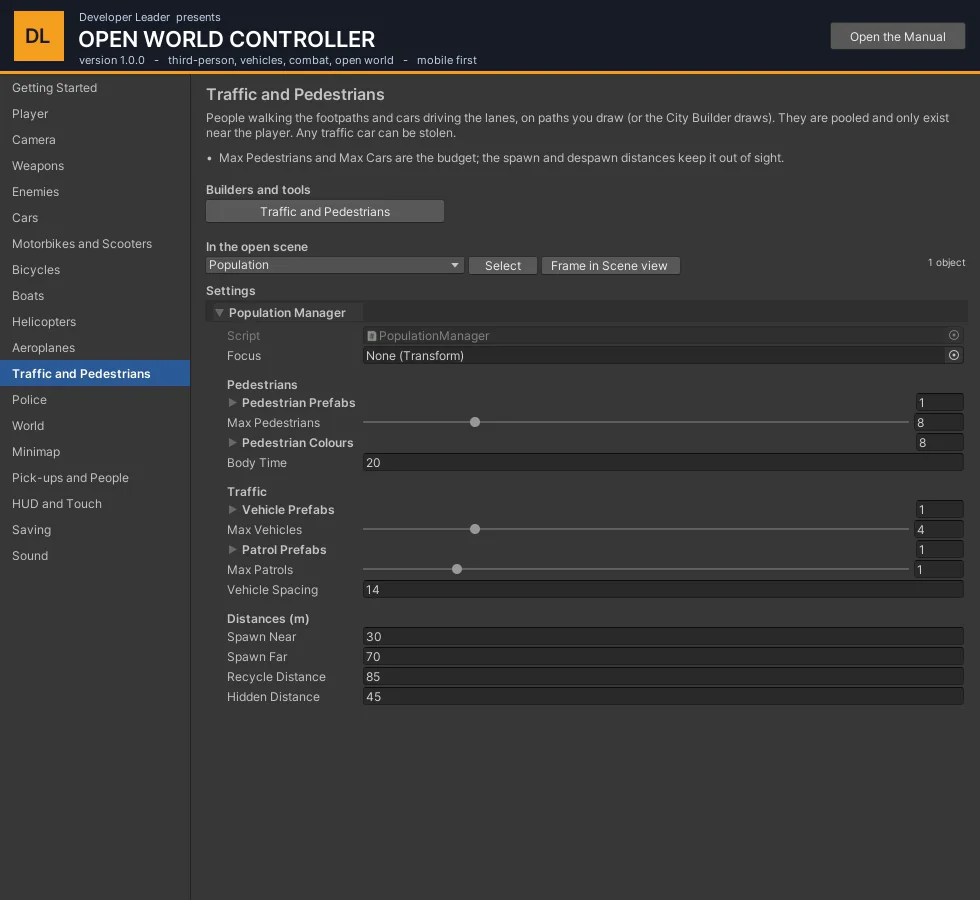
People and cars follow Waypoint Paths: footpaths for pedestrians, lanes for traffic. The City Builder draws them; in your own level, create paths with this window and place points in the Scene view.
The Population Manager keeps a fixed number alive near the player and recycles the ones left behind, so the cost is the same in a small town and a large one.
Pedestrians walk, wait at crossings, flee from gunfire and can be talked to if you make them a Talking NPC. Traffic cars stop for what is in front of them. Every traffic car has a driver; the player can pull them out and take the car.
| Setting | What it does |
|---|---|
| Pedestrian Prefabs, Max Pedestrians, Pedestrian Colours | Who walks, how many at once, and the colours they are given so a crowd from one prefab does not look like one person. |
| Vehicle Prefabs, Max Vehicles, Vehicle Spacing | What drives, how many, and how far apart they are put on the road. |
| Patrol Prefabs, Max Patrols | Cars with a job, such as police patrol cars. |
| Spawn Near / Far, Recycle Distance, Hidden Distance | They appear between the near and far distances from the player, are taken away beyond the recycle distance, and nearer than the hidden distance only where the camera is not looking. |
18Police and the wanted level#
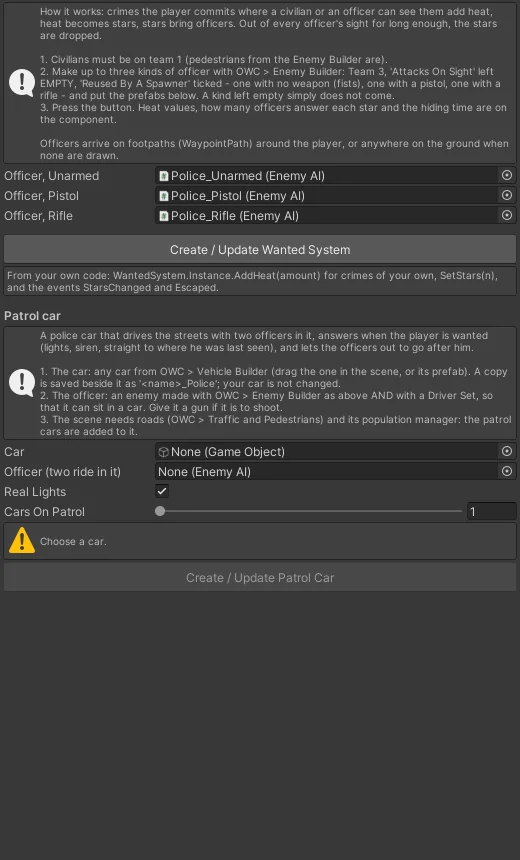
The window creates the Wanted System, builds the three kinds of officer from your model (bare hands, pistol, rifle) and turns any car into a patrol car with a light bar and a siren.
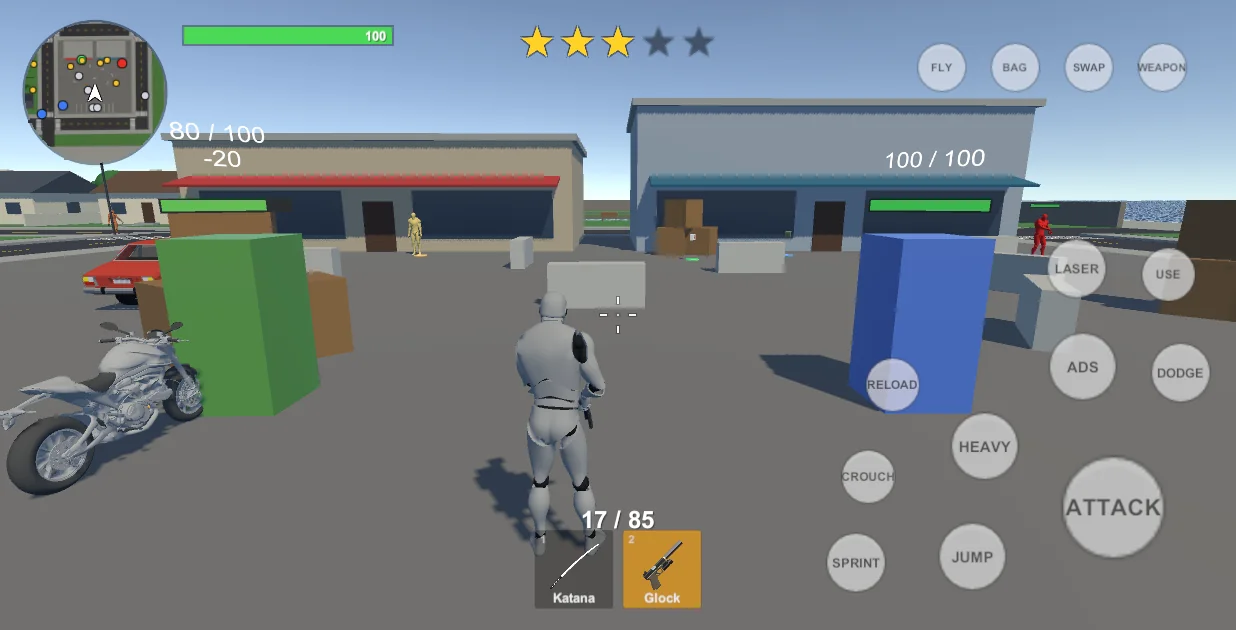
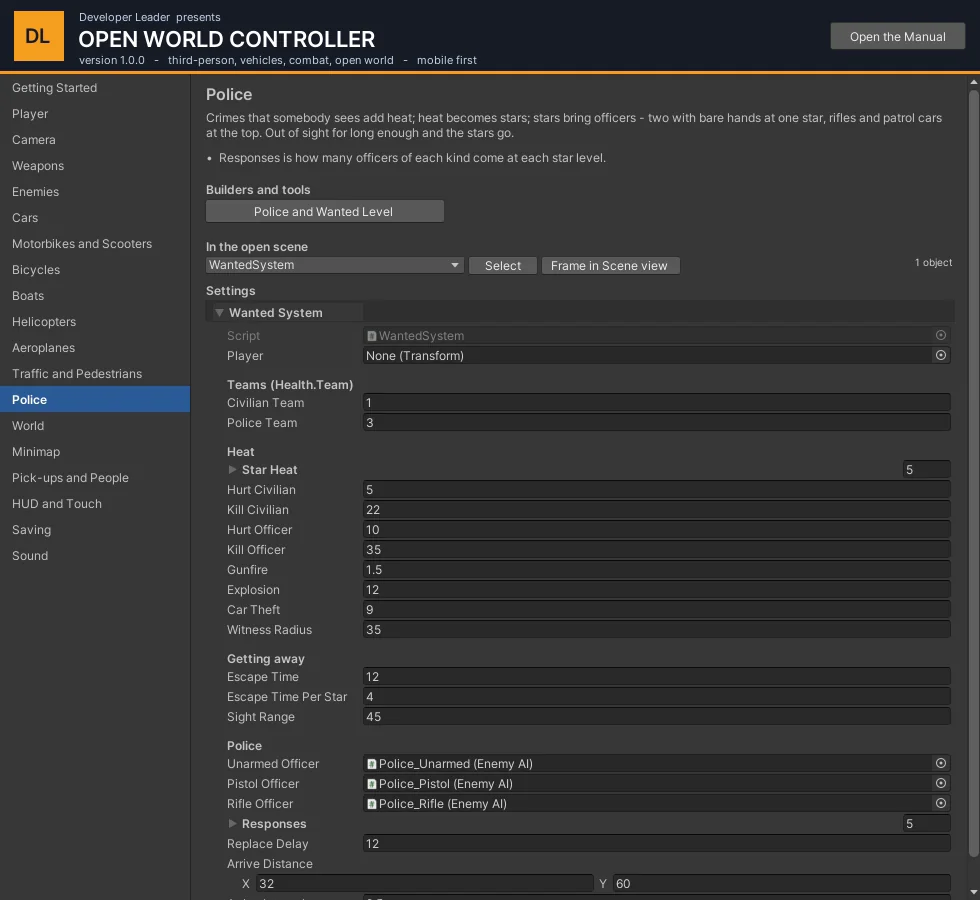
How it works: a crime that somebody witnesses adds heat. Heat becomes stars. Each star level brings more and better-armed officers; from three stars patrol cars answer too. Stay out of sight long enough and the stars go.
| Setting | What it does |
|---|---|
| Hurt / Kill Civilian, Hurt / Kill Officer, Gunfire, Explosion, Car Theft | How much heat each kind of crime adds. Witness Radius is how near somebody must be to have seen it. |
| Star Heat | Heat needed for each of the five stars. |
| Responses | For each star level: how many unarmed, pistol and rifle officers come. |
| Replace Delay | Seconds before an officer who is put down is replaced. |
| Escape Time, Escape Time Per Star, Sight Range | How long out of sight clears the stars, and how far officers see. |
19Minimap#
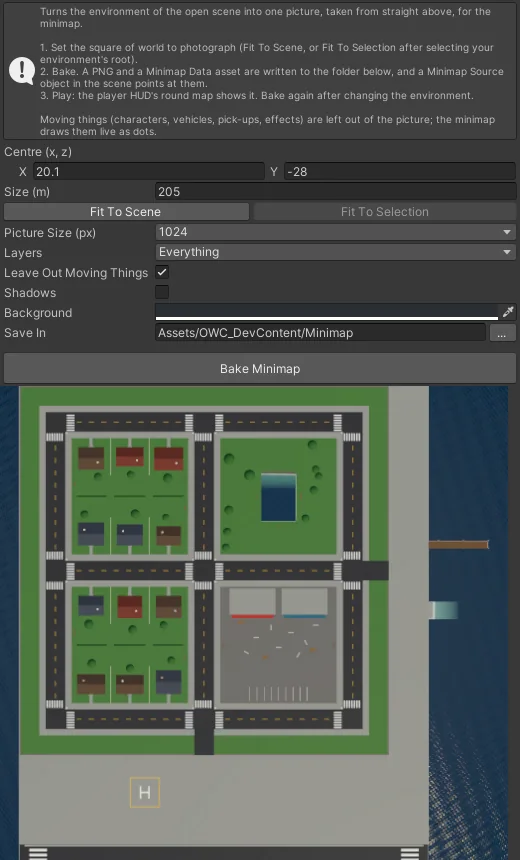
The minimap is a picture taken once from above, not a second camera running all the time - on a phone that is the difference between free and expensive.
- Open the Minimap Baker.
- Fit To Scene frames everything that does not move; adjust Centre and Size if needed.
- Choose a resolution (1024 is plenty) and press Bake.
It writes a texture and a Minimap Data asset, and points the scene's Minimap Source at them. The HUD draws the map turning with the player.
Add a Minimap Marker to anything that should show as a dot (colour and size on the component). Enemies, vehicles and pick-ups made by the builders already have one.
20Pick-ups and people to talk to#
Pick-ups#
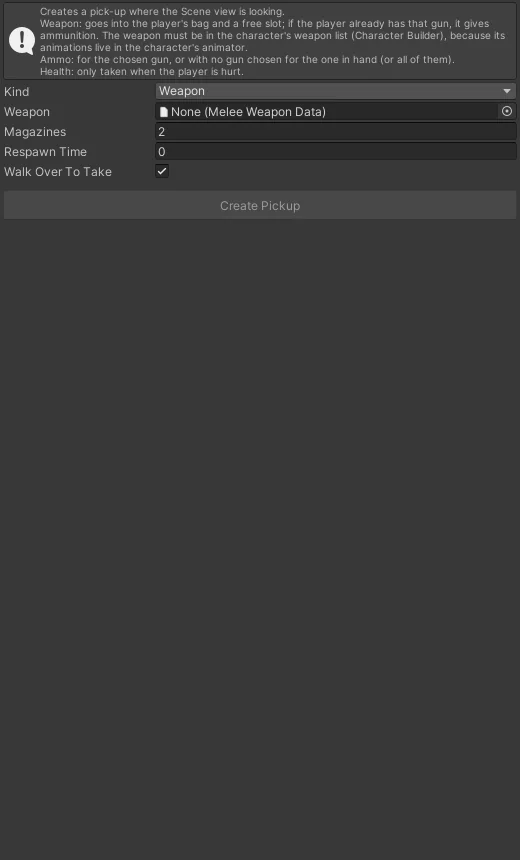
Three kinds: a Weapon (adds it to the bag with some ammunition; if it is already owned it gives ammunition), Ammo (for the gun in hand, or a named gun) and Health. Walk up and press Use. Magazines and Health are how much it gives; Respawn Time brings it back after a while (0 = once only).
People#
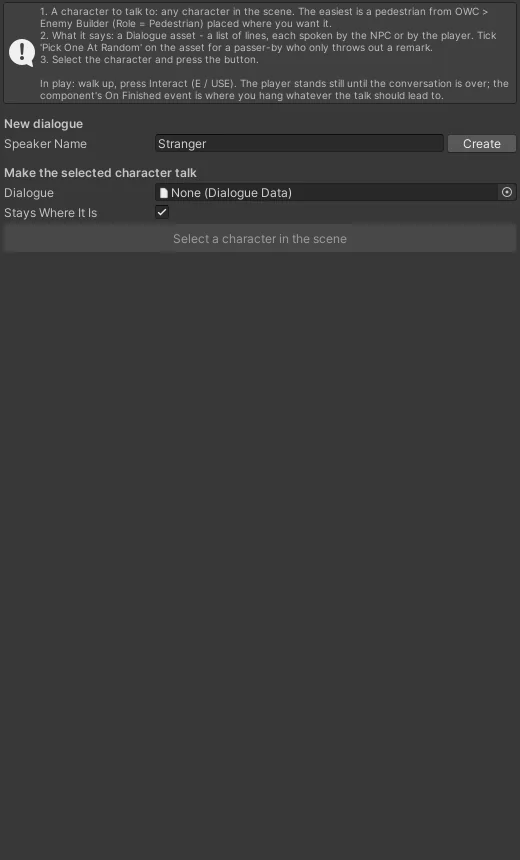
Select a character, write the lines in the Talking NPC window and press Make Talker. A line that starts with > is the player's. Stand Still keeps a pedestrian in place. The conversation is a Dialogue Data asset; the same asset can be given to many characters, and Pick One At Random turns the list into one-liners.
Your own things to use#
Anything the player should be able to use derives from Interactable - see chapter 27.
21HUD and touch controls#
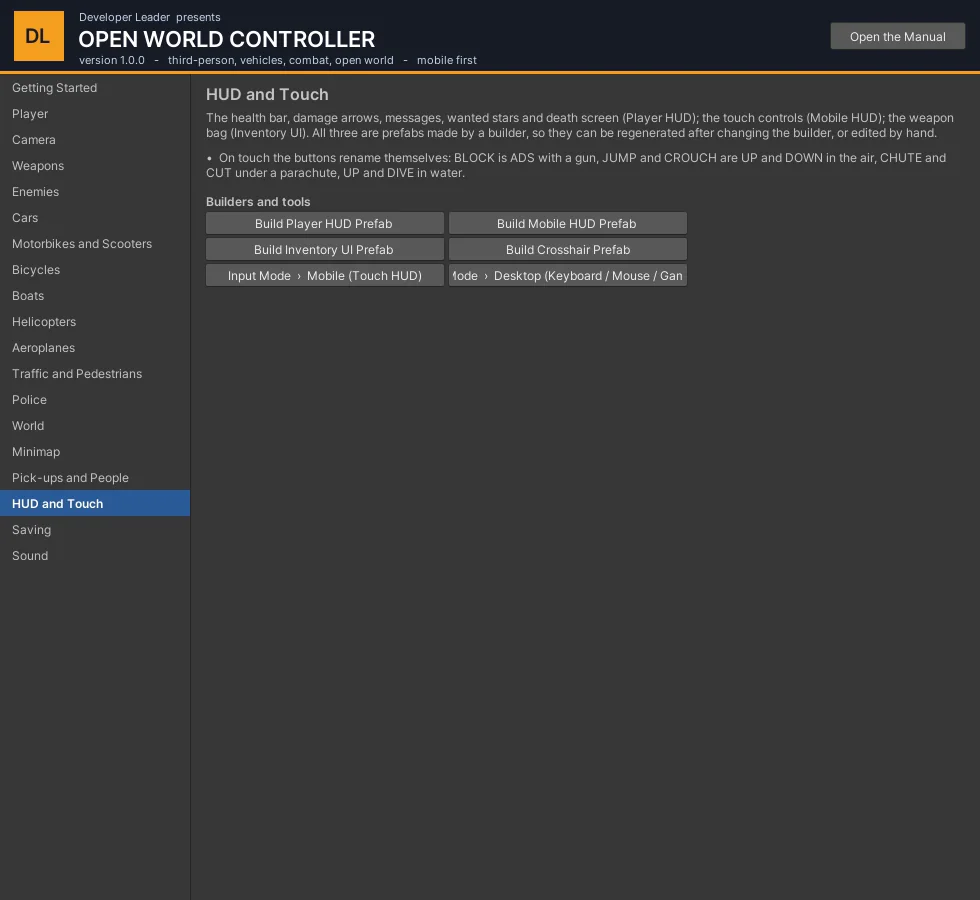
Three prefabs, each written by a builder so it can be regenerated or edited by hand:
| Prefab | What is on it |
|---|---|
| Player HUD | Health bar (with a trailing "damage taken" bar), breath bar, hit-direction arrows, a damage vignette, messages, the minimap, wanted stars, the death screen with a respawn countdown. |
| Mobile HUD | The touch controls. One group for walking, one for driving; the look pad is in both. Buttons rename themselves by situation (chapter 4). |
| Inventory UI | The bag and the quick bar. |
Input Mode (Tools > OWC > Input Mode): Auto picks touch on a phone and keyboard / gamepad elsewhere; Desktop and Mobile force one in the Editor.
Content/Prefabs/UI/MobileHUD.prefab. To change the layout for every project, change MobileHudBuilder and run Tools > OWC > Build Mobile HUD Prefab.22Saving#
Tools > OWC > Create Save System adds the Save System to the scene. It writes one JSON file per slot in the device's persistent data folder (Tools > OWC > Open Save Folder).
| Setting | What it does |
|---|---|
| Slot | The name of the save. |
| Load On Start | Loads the slot when the scene starts, if there is one. |
| Auto Save Interval, Save On Pause And Quit | Saving without being asked (interval 0 = off). |
| Quick Save Key, Quick Load Key | F5 and F9 by default. |
| Show Messages | "Game saved" on the HUD. |
What is saved out of the box: the player's position, health, the bag, the two slots, ammunition for every gun (Player Save State), and which pick-ups have been taken (World Save State). Vehicles and NPCs are not saved in version 1.0. To save your own things, see ISaveable in chapter 27.
23Sound#
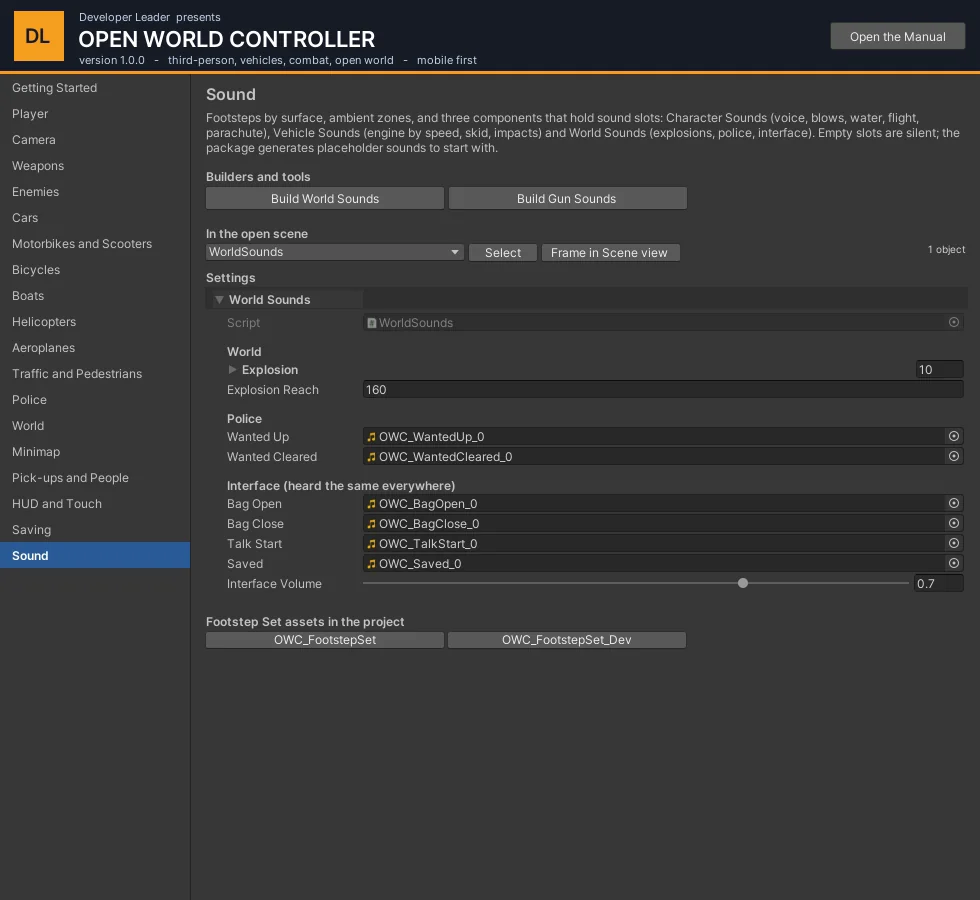
| Piece | What it does |
|---|---|
| Footsteps + Footstep Set | Steps timed by stride length, chosen by the surface underfoot. A set lists surfaces, the words that identify them in a material or object name (grass, wood, metal ...), and clips for each; plus wading and landing. |
| Character Sounds | Voice (hurt, death, effort, jump), punches and blades (swing, hit, block), bow, water, flight, laser, parachute. |
| Vehicle Sounds | Chapter 15. |
| World Sounds | Explosions anywhere, a star gained and the last one lost, the bag, a conversation starting, the game saved. |
| Ambient Zone | A looping background that fades in inside a radius (a park, the sea) or plays everywhere (radius 0). |
| Gun sounds | On each Gun Weapon Data; bullet impacts and the blast on the Gun Effects prefab. |
Short sounds are played through one pool of AudioSources (SoundPool), so nothing is created while the game runs. Empty slots are silent. Tools > OWC > Build World Sounds and Build Gun Sounds generate simple placeholders so a new project is not mute.
24How the code is organised#
Everything is in the OWC namespace, in two assemblies: OWC.Runtime and OWC.Editor. Nothing is in the global namespace, so your own PlayerController or Health never clashes with ours.
| Namespace | What is in it |
|---|---|
OWC.Character | PlayerController, CharacterMotor, PlayerVitals, SwimController, ClimbController, FlightController, ParachuteController, Ragdoll, RespawnPoint |
OWC.Combat | Health, DamageInfo, MeleeCombat, GunController, BowController, WeaponInventory, LaserEyes, Explosion |
OWC.Vehicles | Vehicle, VehicleDriver, VehicleMotor, CarController, BoatController, HelicopterController, PlaneController, VehicleDamage |
OWC.AI, OWC.Traffic, OWC.Police | EnemyAI; PopulationManager, PedestrianAI, TrafficDriver; WantedSystem, PoliceCar |
OWC.Interaction | Interactable, Pickup, TalkNpc, PlayerInteractor |
OWC.Input | PlayerInputState, InputProviderBase and the providers |
OWC.Cameras, OWC.UI, OWC.Audio | CameraRig; PlayerHud, MobileHud; SoundPool, CharacterSounds, VehicleSounds |
OWC.Saving, OWC.World, OWC.Water, OWC.Data | SaveSystem, ISaveable; Disturbance, WorldBounds; WaterVolume; the ScriptableObject data types |
The examples below assume these at the top of the file:
using UnityEngine;
using OWC.Character;
using OWC.Combat;
using OWC.Data;
using OWC.Vehicles;
Finding the player
PlayerController player = FindObjectOfType<PlayerController>();   // once, in Start - keep the reference
Health health            = player.GetComponent<Health>();
WeaponInventory bag      = player.GetComponent<WeaponInventory>();
GunController guns       = player.GetComponent<GunController>();
VehicleDriver driver     = player.GetComponent<VehicleDriver>();
25Recipes#
Give the player a gun and put it in their hands#
public GunWeaponData rifle;          // drag the asset in, e.g. AK47_GunData

void GiveRifle()
{
    bag.Add(rifle);                  // now owned (no effect if it already is)
    bag.Equip(1, rifle);             // into slot 2 (slots are 0 and 1)
    bag.SetActiveSlot(1);            // and into the hands
    guns.AddAmmo(rifle, 90);         // 90 more rounds in reserve
}
The same three calls work for a blade or a bow: every weapon is a MeleeWeaponData (guns and bows derive from it).
Read and set ammunition#
if (guns.HasGun) Debug.Log(guns.Gun.displayName + ": " + guns.Magazine + " / " + guns.Reserve);

guns.GetAmmo(rifle, out int magazine, out int reserve);   // any gun, in hand or not
guns.SetAmmo(rifle, 30, 120);
Switch, draw and put away#
bag.CycleActive(1);                                   // the other slot
var combat = player.GetComponent<MeleeCombat>();
if (combat.IsArmed) combat.Unequip(); else combat.Equip();   // holster / draw
bag.SetOpen(true);                                    // open the inventory screen
Hurt, heal, kill, revive#
var hit = new DamageInfo
{
    Amount = 25f,
    Strength = HitStrength.Light,        // Heavy staggers
    Point = target.transform.position + Vector3.up,
    Direction = transform.forward,
    Source = gameObject,                 // who did it (teams and the police use this)
    Unblockable = false
};
target.GetComponent<Health>().TakeDamage(ref hit);

health.Heal(50f);
health.Invulnerable = true;              // a cutscene
if (!health.IsAlive) health.Revive();
Anything that can be hurt implements IDamageable; Health is the standard one. Explosion.Detonate(position, radius, damage, force, source) hurts and pushes everything in a radius.
Put the player in a vehicle, and get them out#
public Vehicle missionCar;

void StartMission()
{
    if (driver.Enter(missionCar)) Debug.Log("getting in");   // same as walking up and pressing Use
}

void Update()
{
    if (driver.State == VehicleDriver.DriverState.Driving && driver.Vehicle == missionCar)
    {
        float kmh = Mathf.Abs(missionCar.Motor.ForwardSpeed) * 3.6f;
        if (kmh > 120f) driver.Exit();                     // bails out, because it is moving
    }
}
Vehicle.All is every vehicle in the scene. vehicle.Motor.Kind says whether it is Land, Boat, Helicopter or Plane.
Drive a vehicle from code (an AI driver, a cutscene)#
VehicleMotor motor = vehicle.Motor;
motor.Parked = false;
motor.SetInput(new VehicleInput { Throttle = 1f, Steer = 0.3f });   // every frame
// aircraft also read Lift: +1 climb / nose up, -1 sink / nose down
Teleport the player#
player.Motor.Warp(spawnPoint.position, spawnPoint.rotation); // never set transform.position directly
Fly and parachute#
var flight = player.GetComponent<FlightController>();
flight.TakeOff();            // from the ground or in mid-air
flight.StopFlying();         // lets go: stands if near the ground, falls otherwise

var chute = player.GetComponent<ParachuteController>();
if (chute.State == ParachuteController.ParachuteState.FreeFall) chute.Open();
if (chute.IsOpen) chute.CutAway();
The police#
using OWC.Police;

WantedSystem.Instance.AddHeat(10f);     // as if a crime had been seen
WantedSystem.Instance.SetStars(3);      // straight to three stars; 0 calls them off
int stars = WantedSystem.Instance.Stars;
To make your own event count as a crime that needs a witness, raise a disturbance:
using OWC.World;
Disturbance.Raise(DisturbanceKind.Theft, transform.position, 25f, player.gameObject);
Save and load#
using OWC.Saving;

SaveSystem.Save("slot1");
if (SaveSystem.HasSave("slot1")) SaveSystem.Load("slot1");
SaveSystem.Delete("slot1");
A message on the HUD, a sound in the world#
using OWC.UI;
using OWC.Audio;

PlayerHud.Instance.Notify("Mission complete");
SoundPool.Play(clip, transform.position, volume: 0.8f);          // 3D, pooled
SoundPool.Play(clip, Vector3.zero, 1f, 1f, spatial: 0f);         // 2D, for interface sounds
Stop the player's input for a moment#
player.InputProvider.InputEnabled = false; // a menu, a cutscene; the inventory key still works
Camera#
using OWC.Cameras;

CameraRig rig = player.CameraRig;
rig.Shake(1.5f);                                       // degrees
rig.ShakeFrom(blast.position, 20f, 3f);                // stronger the nearer the camera is
rig.SetTarget(cutscenePivot, keepView: true, blendTime: 0.8f);
26Events you can listen to#
Subscribe in OnEnable and unsubscribe in OnDisable.
| Event | Raised when |
|---|---|
Health.Damaged / Died / Revived | This character is hurt, dies, comes back. Health.AnyDamaged / AnyDied are the same for everybody (static). |
MeleeCombat.HitLanded / BlockedHit / StateChanged / WeaponChanged | A blow lands on something, one is blocked, the combat state changes, the weapon in hand changes. |
GunController.Fired / BulletHit / ReloadStarted / ReloadFinished | Each shot, each hit, each reload. |
WeaponInventory.Changed / OpenChanged | The bag or the slots change; the inventory screen opens or closes. |
VehicleDriver.StateChanged | OnFoot, Entering, Driving, Exiting, Bailing, Tumbling. |
Vehicle.DriverChanged / Impacted / Crashed / Flooded / RanOver | Somebody takes or leaves the seat, a collision (with the speed lost), a rider thrown, the vehicle floods, it hits a character. |
VehicleDamage.StateChanged / Exploded | Fine, Smoking, Burning, Wrecked. |
SwimController / FlightController / ParachuteController / ClimbController .StateChanged | Each ability's state. |
WantedSystem.StarsChanged / Escaped | The star count changes; the player gets away. |
Pickup.Collected (static) | Any pick-up is taken: which, by whom, and the message shown. |
TalkNpc.Started (static) | A conversation begins. |
Disturbance.Raised (static) | A gunshot, explosion, assault, killing, vehicle hit or theft happens somewhere. |
SaveSystem.Saved / Loaded (static) | A slot is written or read. |
PlayerVitals.Respawned | The player comes back after dying. |
void OnEnable()  { health.Died += OnPlayerDied; Pickup.Collected += OnPickup; }
void OnDisable() { health.Died -= OnPlayerDied; Pickup.Collected -= OnPickup; }

void OnPlayerDied(DamageInfo info) { Debug.Log("killed by " + (info.Source ? info.Source.name : "the world")); }
void OnPickup(Pickup pickup, GameObject who, string message) { score += 10; }
27Writing your own pieces#
Something the player can use#
using OWC.Interaction;

public class Lever : Interactable
{
    public Animator door;
    bool pulled;

    public override bool CanInteract(GameObject who) => !pulled;
    public override string GetPrompt(GameObject who) => "Pull the lever";

    public override void Interact(GameObject who)
    {
        pulled = true;
        door.SetTrigger("Open");
    }
}
Put it on an object; the player's PlayerInteractor finds the nearest usable one, shows the prompt and calls Interact on Use. Range and Auto Trigger (use it by walking into it) are on the base class.
Something that is saved#
using OWC.Saving;

public class QuestLog : MonoBehaviour, ISaveable
{
    [System.Serializable] class Data { public int stage; public int coins; }
    public int stage, coins;

    public string SaveKey => "QuestLog";                    // unique in the scene, the same every run
    public string CaptureState() => JsonUtility.ToJson(new Data { stage = stage, coins = coins });
    public void RestoreState(string state)
    {
        var d = JsonUtility.FromJson<Data>(state);
        stage = d.stage; coins = d.coins;
    }

    void OnEnable()  => SaveSystem.Register(this);
    void OnDisable() => SaveSystem.Unregister(this);
}
A new kind of vehicle#
Everything about getting in, sitting, the camera, the HUD and getting out is done by Vehicle and VehicleDriver, and they only ever talk to a VehicleMotor. A new vehicle is therefore one class:
public class HovercraftController : VehicleMotor
{
    Rigidbody body;
    VehicleInput input;

    public override Rigidbody Body => body;
    public override VehicleKind Kind => VehicleKind.Boat;        // which touch layout to show
    public override void SetInput(in VehicleInput value) => input = value;
    public override float EngineSpeed => Mathf.Abs(input.Throttle);   // for VehicleSounds

    void Awake() => body = GetComponent<Rigidbody>();

    void FixedUpdate()
    {
        ForwardSpeed = Vector3.Dot(body.velocity, transform.forward);
        if (Parked || EngineDead) return;                          // nobody driving, or wrecked
        body.AddForce(transform.forward * input.Throttle * 12f, ForceMode.Acceleration);
        body.AddTorque(Vector3.up * input.Steer * 2f, ForceMode.Acceleration);
    }
}
Add it to an object with a Rigidbody, a collider and a Vehicle (seat point, enter points, camera pivot), and the player can get in and drive it.
A new input device#
using OWC.Input;

public class ReplayInput : InputProviderBase
{
    protected override void Poll(ref PlayerInputState s)
    {
        s.Move = new Vector2(0f, 1f);     // walk forward
        s.SprintHeld = true;
    }
}
Assign it to PlayerController.InputProvider. This is exactly how enemies work: AiInputProvider fills the same struct, and the same combat code runs for them and the player.
A new weapon in code#
var pistol = ScriptableObject.CreateInstance<GunWeaponData>();
pistol.displayName = "Prototype";
pistol.magazineSize = 12;
// ... model, damage, sounds ...  then bag.Add(pistol) as in chapter 25.
In practice, weapons are assets made in the Editor; create them in code only for procedural content.
28Add-on packages without conflicts#
The package is built so that deeper controllers - a full car simulation, a detailed helicopter, a sailing boat - can be separate packages that plug in, without either package editing the other.
- Derive from
VehicleMotor. That is the whole contract (chapter 27). An add-on vehicle keeps using this package'sVehicleandVehicleDriver, so getting in, the camera and the HUD keep working, and it can replace the built-in controller on an existing vehicle object. - Use your own namespace and assembly. For example
OWC.Vehicles.ProinOWC.Vehicles.Pro.asmdef, referencingOWC.Runtime. Never add types toOWC.Runtimefrom another package. - Use your own folder outside
Assets/OpenWorldController, and your own menu root or a sub-menu (OWC/Pro/...), so updating either package never overwrites the other. - Do not rename or re-GUID this package's assets; reference them.
- Check the version you were written against:
OWC.OwcInfo.ApiLevelgoes up by one whenever a contract an add-on can depend on changes (VehicleMotor,PlayerInputState, the save format).OwcInfo.Versionis the release. - Extra camera behaviour belongs in its own component that drives
CameraRigthrough its public calls (SetTarget,Nudge,DistanceOffset,FovOffset) rather than in a second rig. - Extra input (a clutch, flaps) should go through your own actions and component;
VehicleInputcarries the five values every vehicle shares.
#if UNITY_EDITOR
[UnityEditor.InitializeOnLoadMethod]
static void CheckHost()
{
    if (OWC.OwcInfo.ApiLevel != 1)
        Debug.LogWarning("This add-on was written for Open World Controller API level 1; found " + OWC.OwcInfo.ApiLevel);
}
#endif
30Troubleshooting#
| What you see | What to do |
|---|---|
| The character stands in a T-pose and nothing plays. | The Animator has no controller. Press Build in the Character Builder again; if the model is a prefab instance, apply the change to the prefab. |
| No input in Play Mode. | Edit > Project Settings > Player > Active Input Handling must be Both or Input System, and Unity restarted after changing it. |
| The touch HUD does not show in the Editor. | Tools > OWC > Input Mode > Mobile. |
| An attack or a gun pose does nothing. | The weapon was added after the Animator was generated. Build the character again. |
| The driver sits in the wrong place or the hands miss the wheel. | Move VehicleRig > SeatPoint and SteeringWheel on the vehicle (its local Z is the steering column; the grips are its children). |
| A vehicle built from a model with its own colliders behaves oddly. | Non-convex mesh colliders cannot be on a moving body. The Boat and Aircraft Builder disables a model's colliders; for cars, remove them or tick convex. |
| A boat sinks or flips. | Check Hull Size covers the hull, Draught is sensible (0.2 - 0.6 m) and the boat is over a Water Volume. |
| An aeroplane will not take off. | It needs Take Off Speed: more runway, more Acceleration, or a lower take-off speed. Hold Jump (nose up) only once it is fast. |
| The camera, police or HUD confuse two characters. | They share a parent. Keep gameplay objects at the scene root (chapter 28). |
| A setting changed in code has no effect on an existing object. | Values already saved on a prefab or scene object win over a script's defaults. Change it on the component (the Hub shows it). |
| The minimap is out of date. | Bake it again after the level changes shape. |
31Known limits of version 1.0#
- Built-in Render Pipeline only; the water and laser materials have no URP versions yet.
- First-person view is not included (planned as an add-on).
- Vehicles and NPCs are not saved; the player and pick-ups are.
- The car-entry motion is generated from poses and IK, not motion capture; a mocap pack can be dropped into the same slots of the Driver Animation Set.
- Aircraft have no weapons, vehicles carry no passengers besides a police partner, and there is no AI traffic on water or in the air.
- Aircraft pilots are hidden when the model has no cabin (Hide Pilot).
- The helicopter does not strafe: the stick's sideways axis turns it.
- Sound levels are set per component; there is no audio mixer or volume-settings screen.
- The police stay on the road network in cars and do not arrest; traffic lights are not included.
Open World Controller 1.0.0 · © Developer Leader. Generated placeholder content in the package is free to ship with your game.